Start free Start free Open Plannerly (opens in a new tab)

Scope - LOD and LOIN scoping

Visual BIM scopes that everyone can understand: who models what, to what level, by when

Plannerly Scope is level of information need software for BIM scoping. Every element and deliverable sits on one visual grid with milestones across the top, and each cell holds the level of detail, the information requirements and one owner. The grid becomes the MIDP, each TIDP and the checks Verify runs.

Free plan, no card. Everyone you invite joins free.

app.plannerly.com
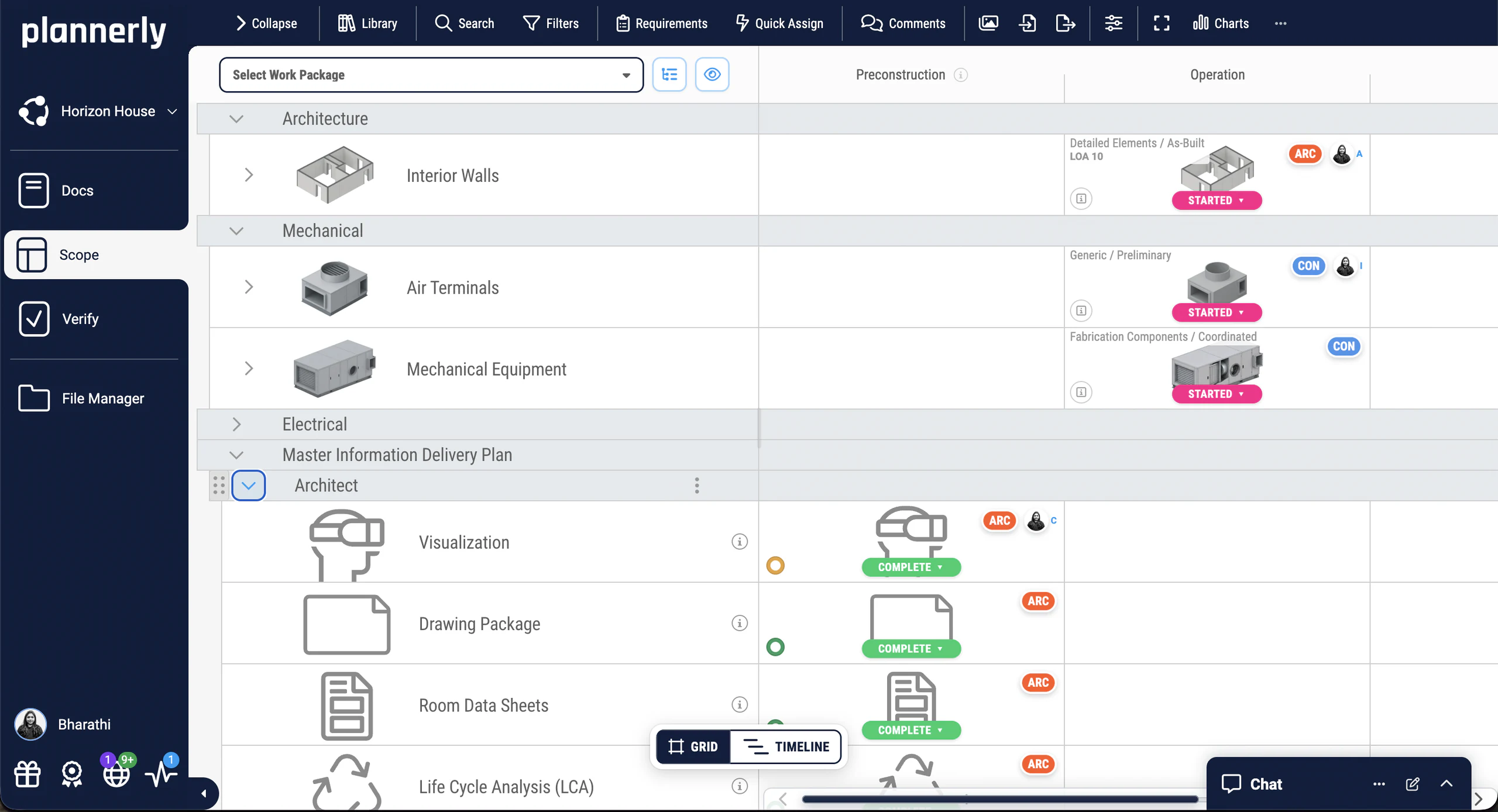
Plannerly Scope: elements by work package across preconstruction and operation, above the master information delivery plan

What one scope saves over a stack of spreadsheets

  • 8 to 2 hoursScope preparation timereiSource, United States: five tools replaced with one
  • 2,000+Object types scoped across 27 model categoriesJTC Corporation, Singapore, replacing 11,000 Excel rows
  • 60%Less time tracking scope and verifying modelsJonathan Griffiths, Senior VDC Engineer, reiSource

How it works

How a scope gets built, owned and checked in Scope

  1. Structure the project

    Starting a matrix from scratch takes weeks. Build the breakdown from Uniclass, Uniformat, OmniClass, your own classification or the buildingSMART Data Dictionary, or drag in a template or a past project.

    Every element and milestone on one grid
  2. Set the level

    "Detailed" means something different to everyone. In each cell, set what that element needs at that milestone: the level of detail, the properties and values, and the documents.

    One agreed level per element, per milestone
  3. Give every cell an owner

    A matrix without names gets ignored. Assign each cell to a team and a person, with dates, copy it to similar cells in a click, and save each team's part as its own work package.

    Who models what, and by when
  4. Share it and check it

    Export the matrix to PDF for signature, to Excel, or as an IDS file. The same requirements then check every model in Verify, so the scope you agreed is the scope you check.

    The scope becomes the checks

Watch Scope in action

See LOD and information requirements on one visual grid

From the free Level 1 course

Visualising BIM, LOD and information requirements

How the grid shows what every element needs at every milestone, so the whole team reads the same scope. One of the free Level 1 Scope lessons.

Everything about one element at one milestone

Its status, team, checklists, information requirements and history, in one place.

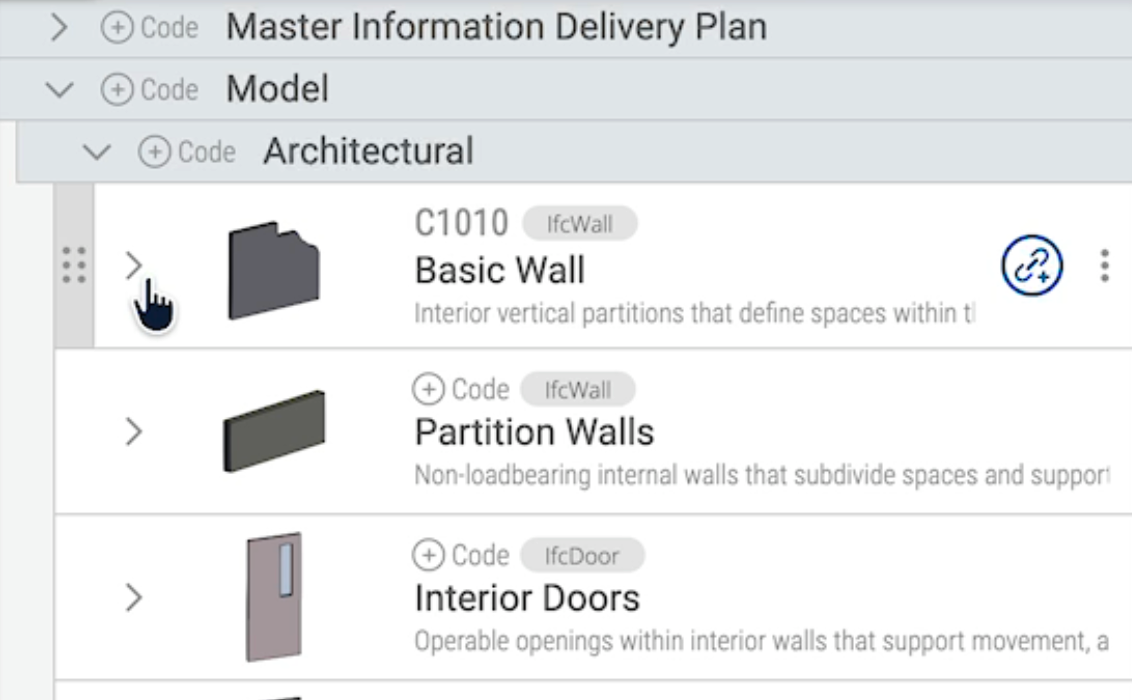
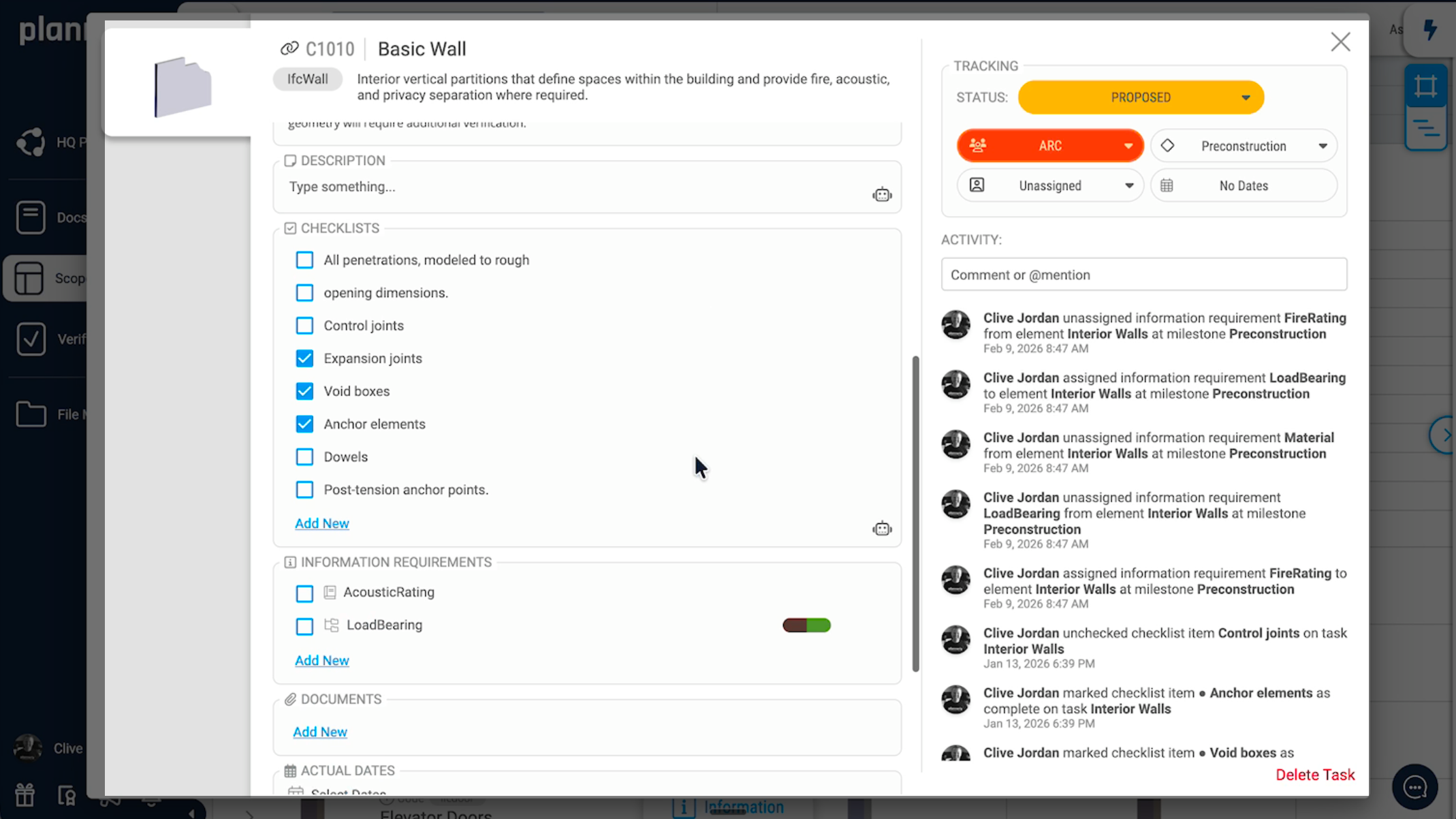
    Plannerly Scope: a basic wall at the preconstruction milestone, with its status, team, checklists, information requirements and activity history
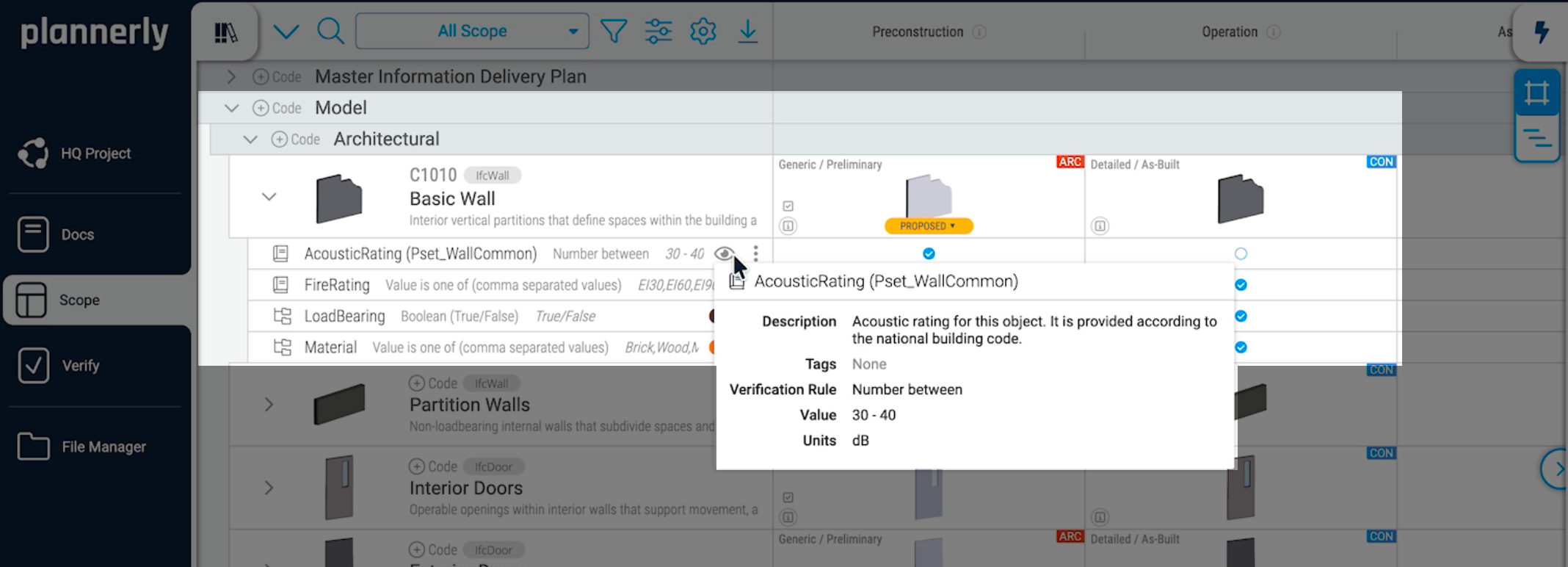
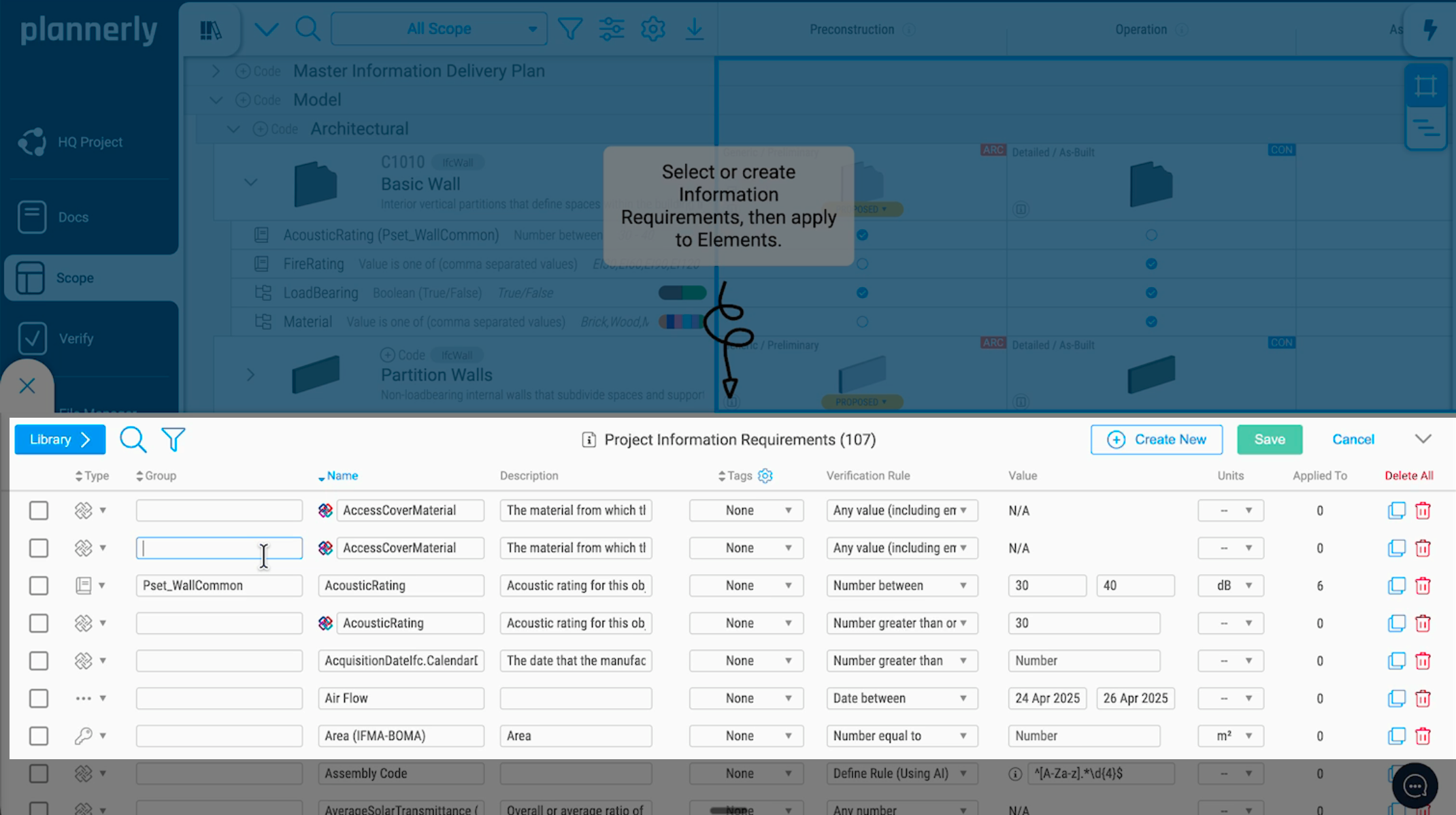
    Plannerly Scope: the requirements on a basic wall, with AcousticRating in Pset_WallCommon set to a number between 30 and 40 dB
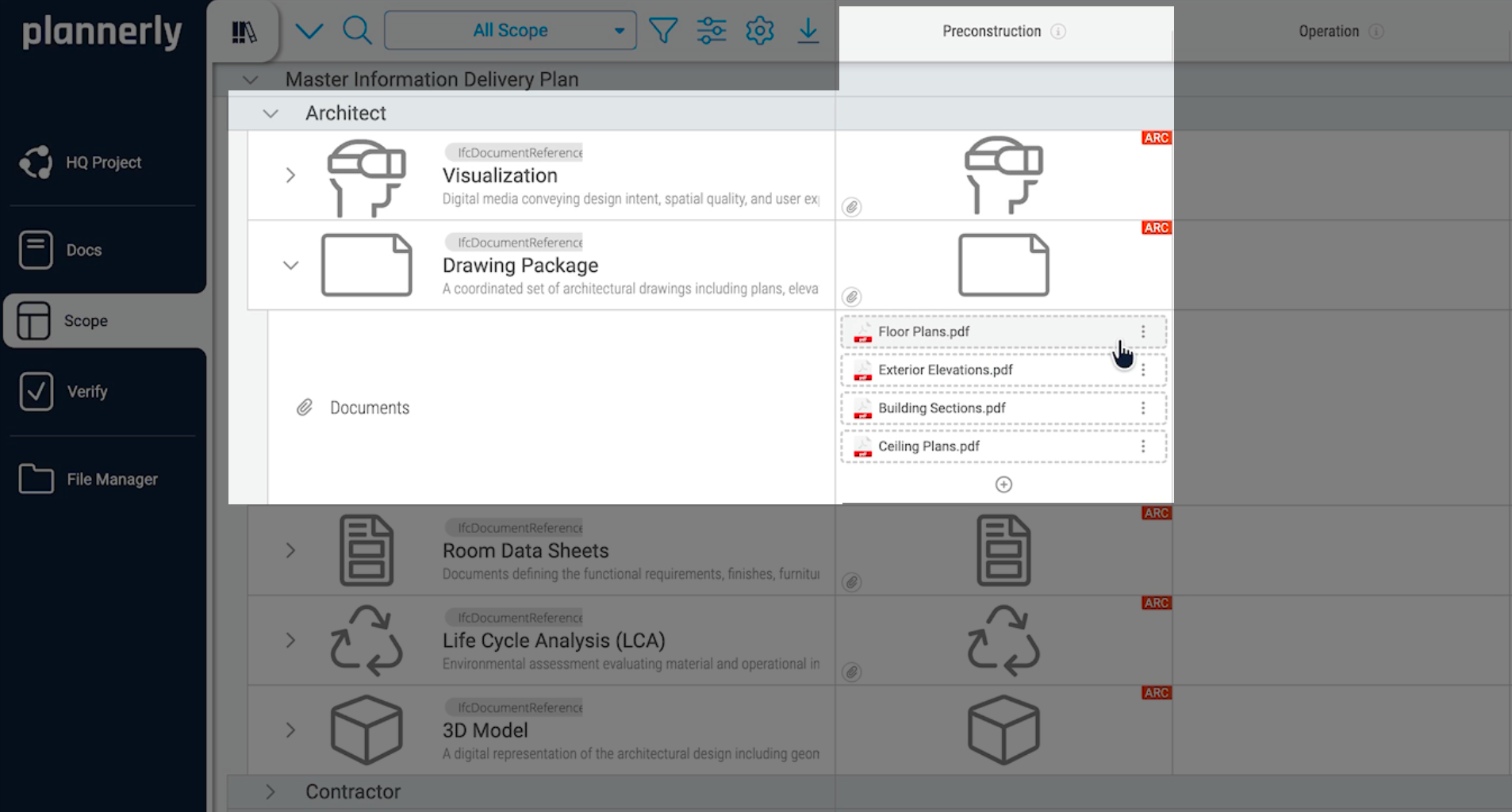
    Plannerly Scope: document placeholders for deliverables that aren't models, such as drawing packages
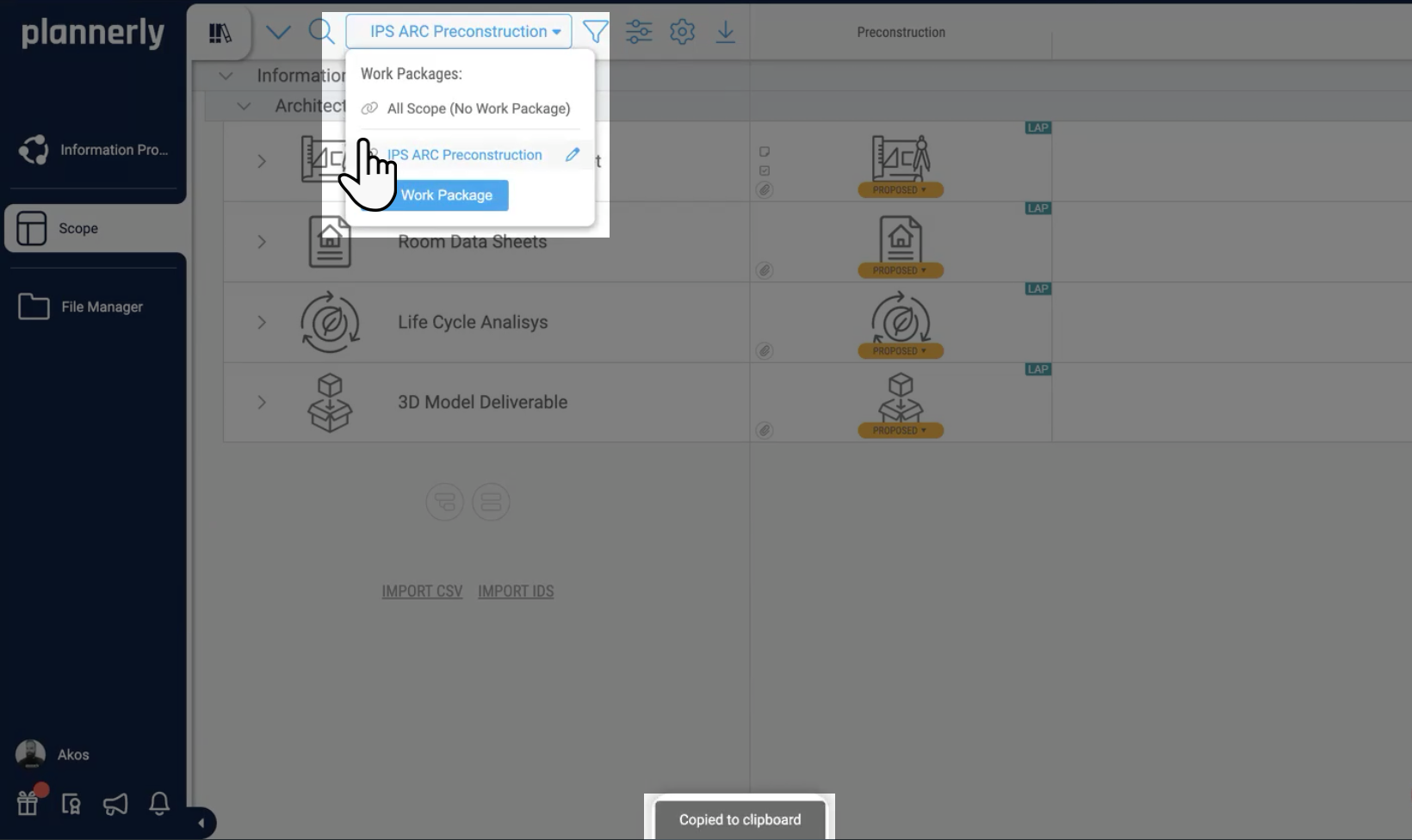
    Plannerly Scope: the work package filter, showing one team's scope

    What you get

    BIM scoping, made visual: standards, templates and one owner per line

    Level of information need

    Geometry, information and documentation for every milestone

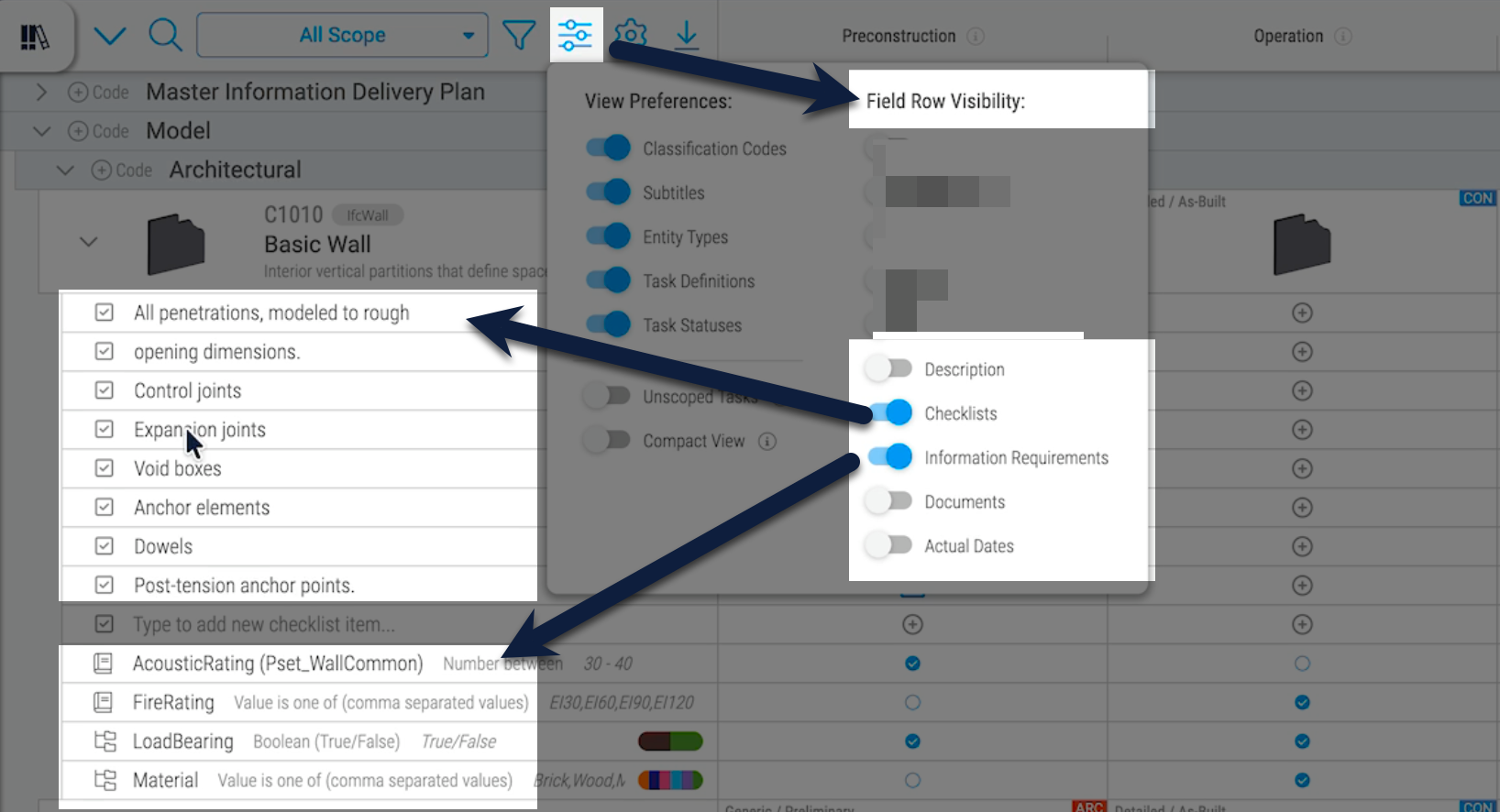
    LOD tables say how developed an element is, but not what information it must carry. Scope is built around the level of information need from ISO 19650 and EN 17412-1, now ISO 7817-1: for each element and information delivery milestone, set the geometry, the information requirements and the documentation it needs. Show requirements, checklists, descriptions or documents in the grid, whichever you're working on.

    • LOD and LOIN in the same grid
    • Requirements as data: property set, rule, value and unit
    • IFC and COBie-based information requirements
    Read: LOIN in BIM, explained
    Plannerly Scope: view preferences, choosing whether the grid shows information requirements, checklists, descriptions or documents

    Global BIM standards

    Start from the framework and classification your contract names

    Every client asks for a different framework, and every spreadsheet copies the last one. Use ISO 19650 and the level of information need, the US AIA and BIM Forum LOD frameworks, or your own, and classify with Uniclass, Uniformat, OmniClass, NRM, MasterFormat, DIN 276 and more - or search the buildingSMART Data Dictionary for classifications and properties as you go.

    • ISO 19650, AIA and BIM Forum frameworks
    • Uniclass, Uniformat, OmniClass and many more
    • The buildingSMART Data Dictionary, built in
    What ISO 19650 asks for
    Plannerly Scope: the project's information requirements panel and its buildingSMART Data Dictionary settings

    Templates library

    Drag in a template or a past project instead of a blank grid

    Rebuilding the same scope on every job is how mistakes creep in. Drag in an example scope, a template or one of your own past projects, from a library of elements and document types, then adjust it for this client. Nest folders into the breakdown you need, and your best scope becomes the start of the next one.

    • Example scopes to start from
    • Import from a template or another project
    • Copy one cell's requirements to similar cells
    Import scope from a template
    Plannerly Scope: the folder hierarchy on the left, with task rows inside a discipline folder

    Clear communication

    One owner on every line, and everyone sees their part

    A matrix where everyone is Consulted and nobody is Accountable gets ignored. Give every cell an accountable team and a responsible person, save each team's part as a work package they can open on its own, and keep the conversation about each requirement on the requirement itself, with its history.

    • RACI on the work itself
    • A work package for each team, shared with a link
    • Comments and history on every requirement
    Agree the RACI
    Plannerly Scope: sharing a work package link, with the team's comments in the activity log

    Model checking

    The scope you agreed becomes the checks

    A requirement nobody checks is a suggestion. Export the scope as a buildingSMART IDS file for the checking tool your authors use, or check every model against it in the Verify module, element by element, automatically. Print formatted PDFs of the matrix for signature, or export it to Excel.

    See how Verify works
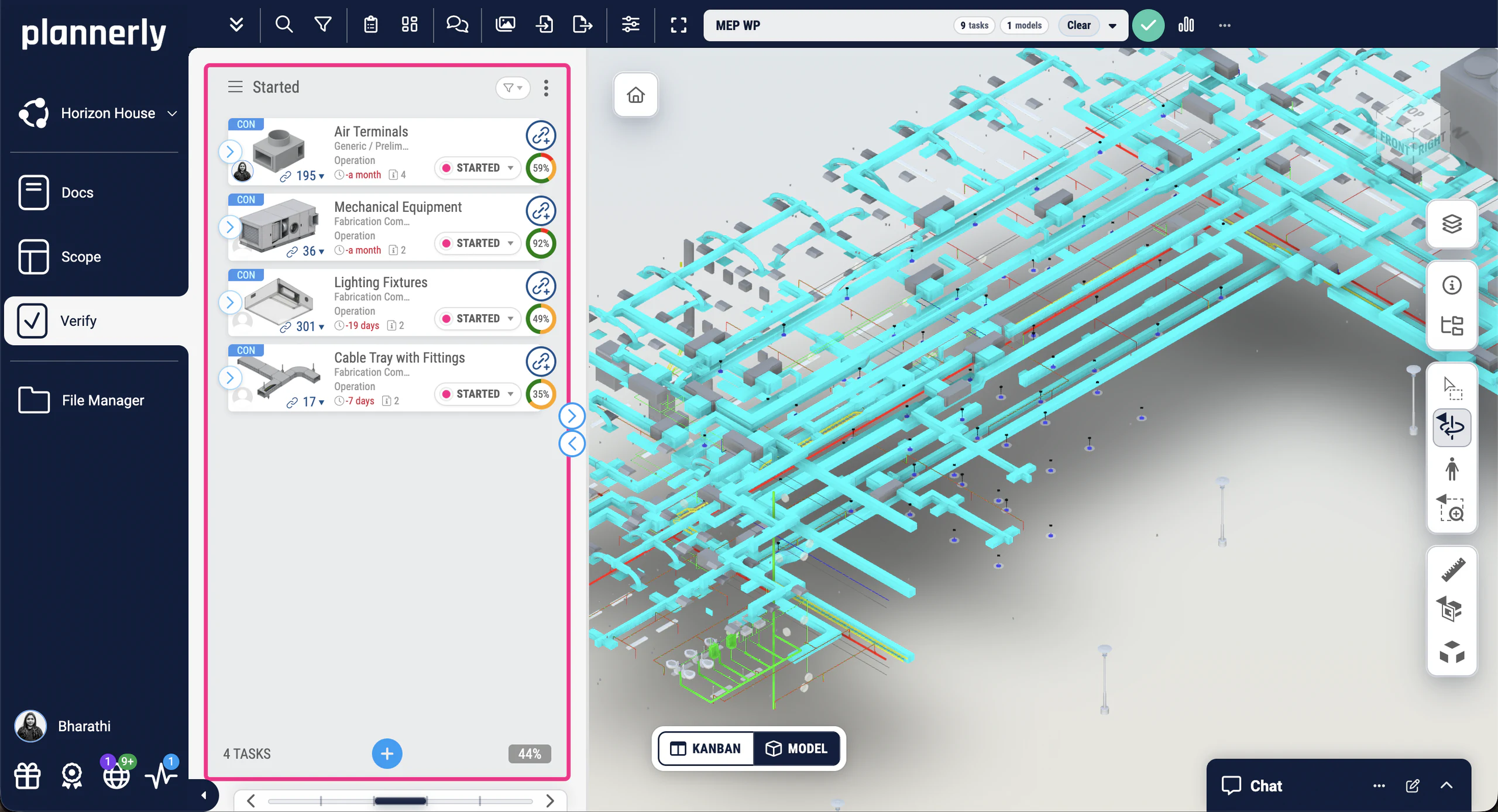
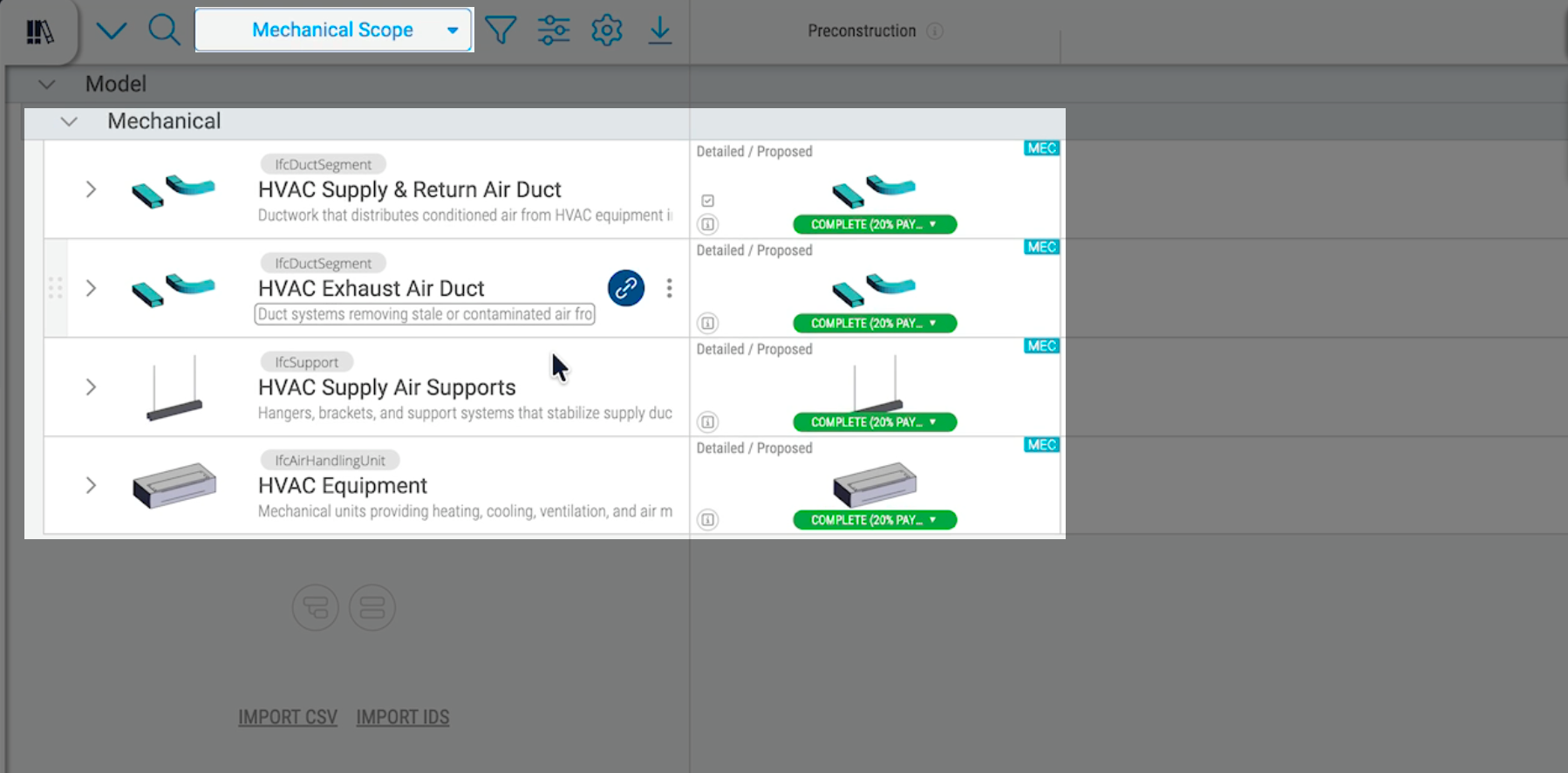
    Plannerly Verify: four MEP tasks, each with its linked elements and its share of checks passed, beside the 3D model

    Free download

    Scope your next project from ours: a starter project and three free PDFs

    Free download

    Scope at Scale Survival Kit: a starter project and 3 PDFs

    Everything to scope LOD and LOIN the way this page does: a starter scope with elements, milestones and requirements, and three free PDFs on combining LOD, LOIN and LOA, setting requirements and roles, and the detailed responsibility matrix.

    • 1 starter project
    • 3 PDFs
    • Free

    Case studies

    Teams that scope every element on one grid

    A world-leading architecture studio managing BIM requirements across its global portfolio, a VDC consultancy that replaced five tools with one, and a government agency that scoped 2,000+ object types instead of 11,000 Excel rows.

    • United Kingdom

      Global practice

      World-leading architecture studio

      Making global BIM scope visible

      Foster + Partners · Architecture

      One of the world's most celebrated architecture studios uses Plannerly to manage structured BIM requirements across their global portfolio of landmark projects.

      Trusted by one of the world's most iconic architecture practices to manage BIM requirements at a global scale.

      • Architecture
      • Global
      • BIM Management
    • United States

      5x growth · 60% faster

      VDC workflows streamlined

      Five tools gone, one source of truth

      reiSource · VDC consultancy

      Replaced 5 disconnected tools with one platform. Scope prep dropped from 8 hours to 2 and the team scaled from 3 to 15 without compromising quality.

      What we used to do with five tools, we now do with one, and with more consistency.
      Christopher Allen, Co-founder · reiSource
      • VDC
      • Tool consolidation
      • Scale-up
    • Singapore

      95% faster

      Model validation time

      From 11,000 Excel rows to automated checks

      JTC Corporation · Government agency

      Eliminated 11,000 Excel rows and automated compliance checks across 2,000+ object types and 27 model categories with Plannerly's Verify module.

      Before Plannerly, it took weeks to do model checks. Now we do it in hours.
      John Kiong, Director · JTC Corporation
      • ISO 19650
      • Verify
      • Government

    See all case studiesOwners, design teams, contractors, consultants and educators - filter them by your kind of organisation.

    What teams say

    Owners, contractors and consultants on scoping with Plannerly

    What changes when the scope is one grid everyone can read, with an owner on every line.

    • 5 out of 5

      Our design teams, PMs, and Clients love the clarity that Plannerly brings!
      Matthew FullerBIM Program Lead · Texas Instruments
    • 5 out of 5

      Plannerly cut the time we spent tracking scope and verifying models by 60%.
      Jonathan GriffithsSenior VDC Engineer · reiSource
    • 5 out of 5

      I feel like I work at Disneyland when I show off Plannerly. It's so simple and visual!
      Cindy BaldwinPresident · VDCO Tech
    • 5 out of 5

      Plannerly accelerated our standards creation and virtually eliminated the burden to get updates to end users.
      John RussoPresident · USIBD
    • 5 out of 5

      It gives structure. It restructures everything. Everyone knows what they have to do.
      András Ábele-NagyHead of BIM · BuildEXT
    • 5 out of 5

      Plannerly makes our conversations easier, it makes buy-in easier. It's a great basis of conversation and agreement.
      Jeff ThompsonAssistant Director · Broward County

    Setup guides

    Set up your scope in Plannerly, step by step

    Short Help Center guides that walk you through each step in Plannerly. Open one beside the app and follow along.

    Give every cell an owner

    Share it and check it

    Learn it properly

    Level 1 · BIM Management Basics

    Defining your information requirements database

    Questions

    BIM scoping and level of information need: your questions, answered

    What is the level of information need (LOIN)?
    The level of information need says exactly which geometry, information and documentation each element needs at each information delivery milestone, and why - so teams model and record what's needed, not everything. It comes from ISO 19650 and was set out in EN 17412-1, now ISO 7817-1. LOIN in BIM, explained.
    What is BIM scoping software?
    Software for defining what a BIM project must deliver: which elements and documents, to what level, at which milestone, and who is responsible for each. Plannerly Scope puts all of it on one visual grid instead of a matrix in Excel, and the same grid becomes the MIDP, each team's TIDP and the requirements every model is checked against. Scope LOD and LOIN at scale.
    LOD or LOIN: which should I use?
    Whichever your client asks for, and often both. LOD describes how developed an element is; LOIN describes exactly which geometry, information and documentation are needed, and why. Plannerly holds both in the same grid. LOD, LOIN and LOA explained and the BIMForum LOD specification.
    How do I build a LOIN matrix for a whole project?
    Start from structure, not a blank sheet. Pick a classification, set your milestones, then define for each element and milestone the geometry, information and documentation it needs. Reuse what you can: drag in a template or a past project, and copy one cell's requirements to similar cells. Model progression and delivery matrices in Scope.
    Which classification systems can I use?
    Uniclass, Uniformat, OmniClass, NRM, MasterFormat, DIN 276 and many more, or your own breakdown. You can also search the buildingSMART Data Dictionary for classifications and properties right from Scope. Connect the bSDD.
    Can I start from a template or a past project?
    Yes. Import scope from a template, an example project or one of your own past projects, then adjust it for this client. Many teams keep one template project as their company standard. Import scope from a template or another project and make it your company standard.
    How does each team see its own part of the scope?
    Save each team's part as a work package. Filter the grid by milestone, folder or team, save it, and share the link: the team sees only its own deliverables, and the same work package can be scheduled and checked on its own. The Scope interface, including work packages.
    Is the scope the same as the MIDP and TIDPs?
    It's the same data. Every deliverable in Scope has an owner, a milestone and dates, each team's part is its TIDP, and they roll up into the MIDP automatically. A model production and delivery table or a responsibility matrix is another view of it. MIDP and TIDP explained and run the MIDP.
    Can I export the scope?
    Yes: to formatted PDF for signature, to Excel, or as a buildingSMART IDS file for model checking. COBie export is part of Pro. Export scope to Excel and how to create an IDS file.
    Does Scope handle COBie?
    Yes. Assign IFC and COBie-based information requirements to each element and milestone, and export COBie on Pro. Verify then checks that the delivered models carry the data. COBie and BIM verification and COBie handover, a free lesson.
    Can AI help me build the scope?
    Yes, if you want it to. AI can draw a picture of each level of geometry for a row, so everyone sees what 'detailed' means, and draft a task's description and acceptance criteria for you to check - or you write them yourself. Requirements management in Scope, step by step.
    How much does Scope cost?
    You can start free and build your scope grid on the Free plan. Pro is priced per project and adds unlimited editors, so every team works on its own lines, plus COBie export and tender teams. You can try every Pro feature free for 14 days, with no card. See the prices.

    Pricing

    Start free, and bring every team in as an editor on Pro

    Free $0forever
    • Five projects included
    • The account owner edits; everyone they invite can view
    • 100 MB of project files
    • Explore Docs, Scope and Verify
    • Build your scope grid and invite people to view it
    Start free
    5 projects included free Pro
    Choose your modules
    $249/ month
    • Five projects included
    • Unlimited editors and viewers
    • 50 GB of project files
    • Your branding on everything you export
    • Each project beyond five: $49 a month
    • Unlimited editors and viewers
    • COBie export, and tender teams before appointment
    • Export the matrix with your own branding
    • Try every Pro feature free for 14 days, no card
    Start free, then try Pro for 14 days

    Prices in US dollars. You'll see the price for your country in the app.

    Replace the matrix nobody reads.

    Start free, drag in a template, and give every element a level, its requirements and an owner.

    Free plan · No card · Everyone you invite joins free

    Sign in to keep your progress

    Use your Plannerly account - the same email and password as the app. Every lesson stays open either way.

    Learned with a different email? Sign in to that account here and we'll bring its courses, progress and certificates into the one you're signed in with. Certificate links and QR codes keep working.

    Forgot that password? Reset it first, then come back. Want to keep the other account instead? Sign out and sign in with that one.