Plannerly logo in navy
For white and light backgrounds.

Brand and press kit
Everything partners, event organisers and journalists need to show Plannerly: our logos and symbol, the app's module icons, colours and fonts, a one-minute video, slides, a flyer and a short description.
SVG and transparent PNG files, in navy and white
One-minute intro
Use the navy logo on white and light backgrounds, and the white logo on navy, photos and other dark backgrounds. Keep clear space round the logo at least as wide as the round part of its P, and use the files as they are: please don't recolour, outline, stretch or redraw them.
For white and light backgrounds.
For navy, photos and other dark backgrounds.
The P on its own, for small spaces where the whole logo won't fit, such as a profile picture or an app icon.

For white and light backgrounds.

For navy, photos and other dark backgrounds.
The icons for Plannerly's four modules, the same ones you see in the app, drawn in Plannerly navy.

Project documents such as the EIR, BEP and protocols, written from ISO 19650 templates.

Every element, deliverable and requirement on one grid, by milestone, with one owner per line.

Every model checked against your requirements, automatically.

Every delivered file with its source, version and author, kept in step with your CDEs.
Plannerly navy and white do most of the work, with Plannerly blue and mint as accents, action blue for buttons and ink for text.

HEX #0E1E3D · RGB 14, 30, 61
The logo's colour: headings, and navy backgrounds.

HEX #009EF5 · RGB 0, 158, 245
Our signature blue, from the app: highlights, pictures and icons on navy.

HEX #50E3C2 · RGB 80, 227, 194
The accent for agreed and done: progress, highlights and accent words on navy. Not for text on white.

HEX #0077C8 · RGB 0, 119, 200
Buttons, with white text on them.

HEX #1C2430 · RGB 28, 36, 48
Body text on white and light backgrounds.

HEX #FFFFFF · RGB 255, 255, 255
Backgrounds, and the logo and text on navy.
Plannerly uses Roboto and Roboto Condensed, both free from Google Fonts.
For headings and text, in Regular, Medium, Bold and Black for large headings.
For the short labels above headings, in Regular and Bold.
Plannerly in a few slides: click through them on the web, or download the PDF to present in your own talk.
A printable A5 flyer, front and back: one plan where every line has an owner who agreed to it, the tools it works with, and a QR code that opens a free ISO 19650 starter pack. Print it on any printer, or give a print shop the version with a 3 mm bleed.
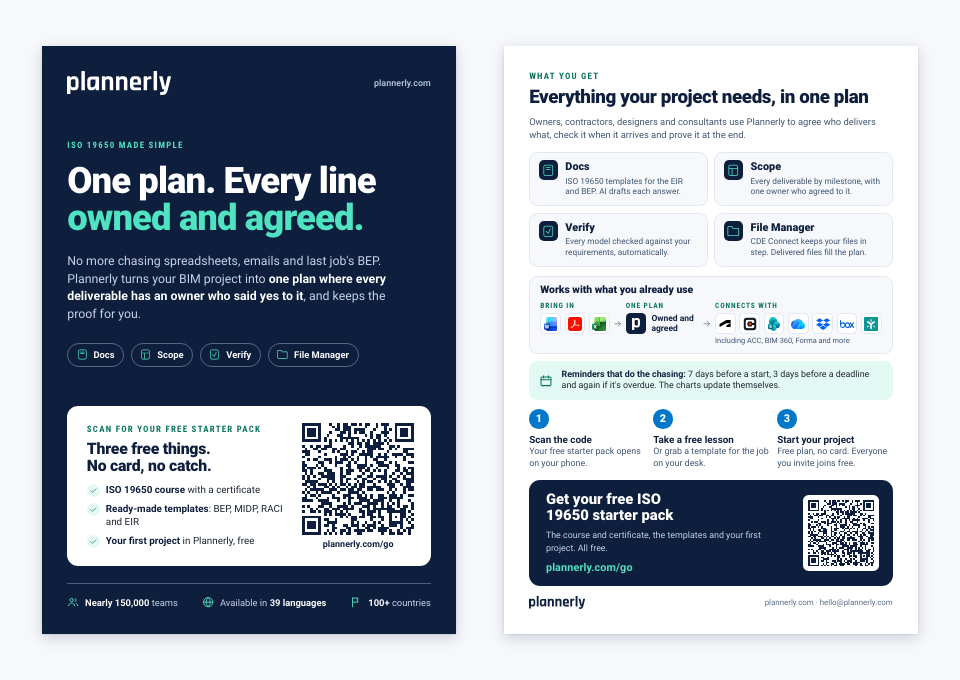
Download the A5 flyer (PDF) · Print-shop version with 3 mm bleed (PDF)
Partners: want the flyer with your own referral link in the QR code? Email hello@plannerly.com and we'll make you a copy.
Plannerly partners can show the Plannerly logo and symbol above beside their own, with the same clear space round them. Want to become one? See the Plannerly Certified Partner Program.
Follow and tag us: @plannerlyAEC, #plannerly and #SmartLeanBIM.
Two short descriptions to copy, and a photo of the team.

Plannerly is the BIM and ISO 19650 management platform: documents, scope, model checking and files in one plan.
Plannerly is a BIM and information management platform built around ISO 19650 compliance. Teams write their project documents in Docs, plan who delivers what and when in Scope, check models against their requirements in Verify and manage their files in File Manager, with AI to draft the paperwork. Nearly 150,000 teams use it - owners, contractors, design teams and consultants in more than 100 countries - to agree who does what and keep the evidence. Plannerly is available in 39 languages. Let Plannerly handle the technicalities, so you can focus on what you do best.
In their own words
Owners, contractors, consultants and learners on working with Plannerly.
5 out of 5
Compliance checks used to be a black box. Now, every requirement is traceable and auditable.
5 out of 5
Plannerly cut the time we spent tracking scope and verifying models by 60%.
5 out of 5
Plannerly makes our conversations easier, it makes buy-in easier. It's a great basis of conversation and agreement.
5 out of 5
Plannerly is both a tool and a process. It gives my teams an advantage over the competition.
5 out of 5
When you're helping governments go digital, you need a platform teams actually understand. That's Plannerly.
5 out of 5
At the end of that certification, I felt like I had some confidence in me to go for this path.
Questions
The best way to write about Plannerly is to try it. Start free, or book a 30-minute call and we'll show you around.
Free plan, no card needed