Start free Start free Open Plannerly (opens in a new tab)

Plannerly demo

See simple ISO 19650 compliance on your own project

Watch Plannerly in one minute, or the whole BIM management workflow in 25. Then book a free 30-minute live demo shaped around the job you're stuck on - the BEP, the MIDP, the RACI or the models that keep arriving without what you asked for.

Free plan, no card. Everyone you invite joins free. Used by nearly 150,000 teams in 100+ countries.

app.plannerly.com
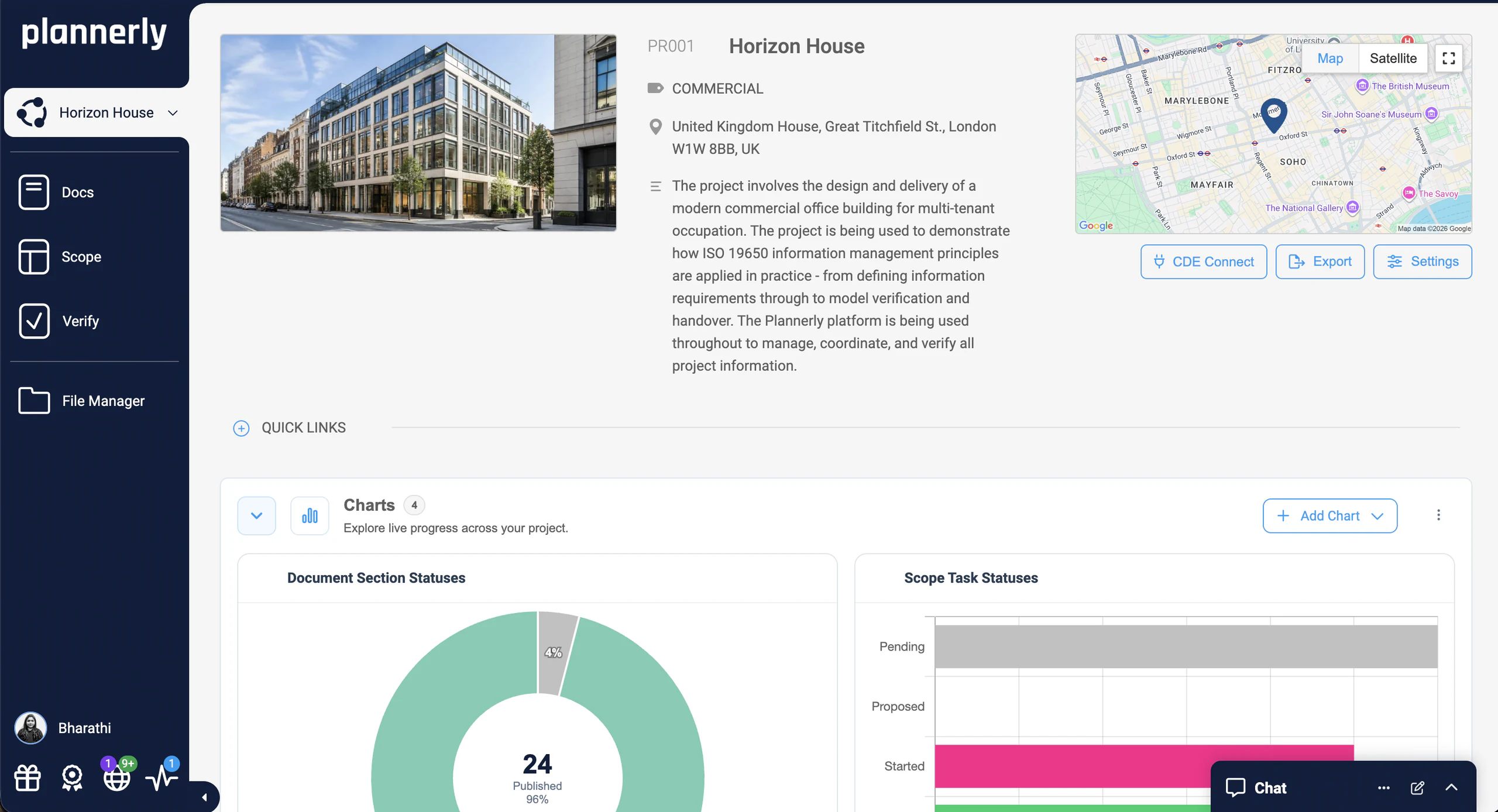
Plannerly project dashboard for Horizon House: the project details, CDE Connect, and live charts of document and scope task statuses

Watch the demo

One plan for your whole BIM project, in a minute

One simple workflow

Plan docs, scope tasks, verify models, manage files

Your Word documents, PDFs, spreadsheets and schedule become one visual plan, where every deliverable has an owner and every owner has agreed to it. Want the long version? The full 25-minute walkthrough is further down.

Who it's for

Plannerly is a great fit if you

Want what was agreed to be obvious

Every deliverable, its owner and its date in one plan, so nobody has to dig through emails to find out what was promised.

Run projects across several companies

And you need one consistent way to plan and track what each task team delivers, on every project.

Are tired of Word, Excel and email approvals

And you want one workflow with clear sign-offs, built-in e-signatures and a record of who agreed what.

Spend too much of the week chasing

Files, dates and status updates from task teams. You'd rather the reminders and the charts did it for you.

Want models checked against what you asked for

Automatically, element by element, instead of opening every model and checking it by hand.

Are working toward ISO 19650

Or your client asks for it. Plannerly follows the ISO 19650 workflow, from the information requirements to handover.

Who it's not for

Plannerly may not be for you if you

Only need a file viewer

If you don't manage requirements, scope or sign-offs, a model viewer or your CDE will do the job.

Don't manage BIM scope or information requirements

Plannerly's value is in planning who delivers what, and holding everyone to it.

Prefer fully manual document workflows

Plannerly is built for structured information management: shared templates, clear approvals and ISO 19650-aligned delivery.

The problem

The plan lives in five files, and none of them agree

Requirements, BEP and MIDP in separate files

The BEP is a Word file, the MIDP a spreadsheet, the responsibility matrix an appendix, and the sign-offs are in someone's inbox. By week three they no longer agree.

Nobody owns the line that slipped

Everyone is Consulted and nobody is Accountable, so when a deliverable goes missing nobody can say who owned it, or show that they agreed to it.

Models arrive without what you asked for

Checking them by hand takes days, so the missing data turns up at handover, when it costs the most to fix.

Less chasing

Stop being the reminder system: let the plan do the chasing

Reminders and charts

Reminders go out on their own, and the charts show who's behind

Chasing dates by email is a job nobody signed up for. Everyone assigned to a task is reminded 7 days before it starts, 3 days before it's due and again if it's overdue, and you can adjust the timings. As statuses move, the charts update automatically, so you see what's outstanding without a tracker to keep alive.

  • Reminders before starts and deadlines, and when overdue
  • Charts by team, milestone or work package
  • A weekly PDF report that sends itself
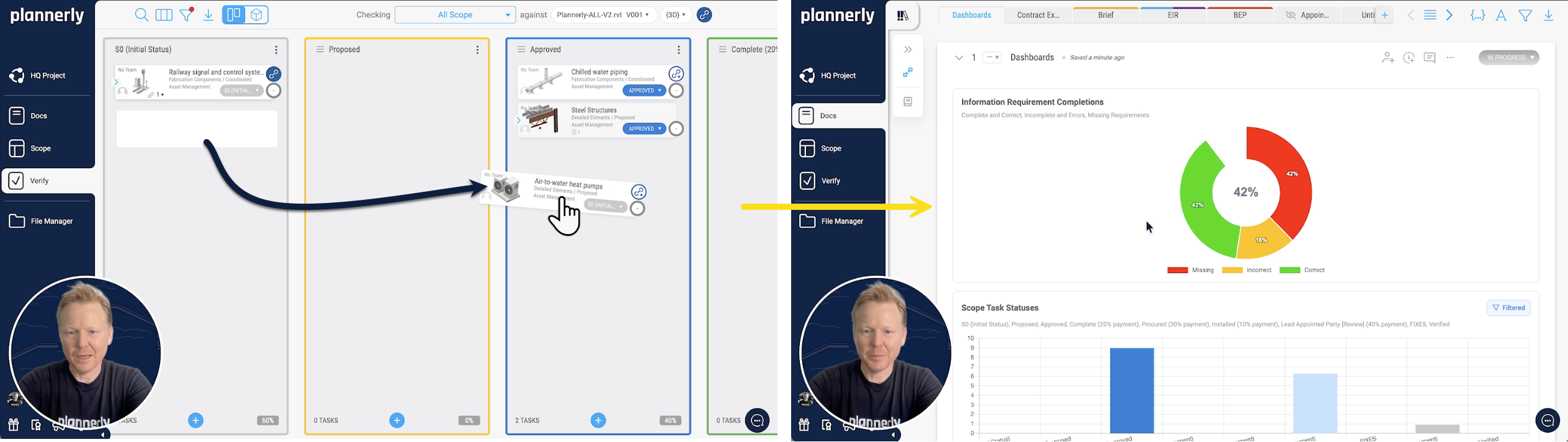
Plannerly Verify: a task moved across the Kanban board, and the Docs dashboard of requirement completions and task statuses updating

Files

Delivered files fill the plan by themselves

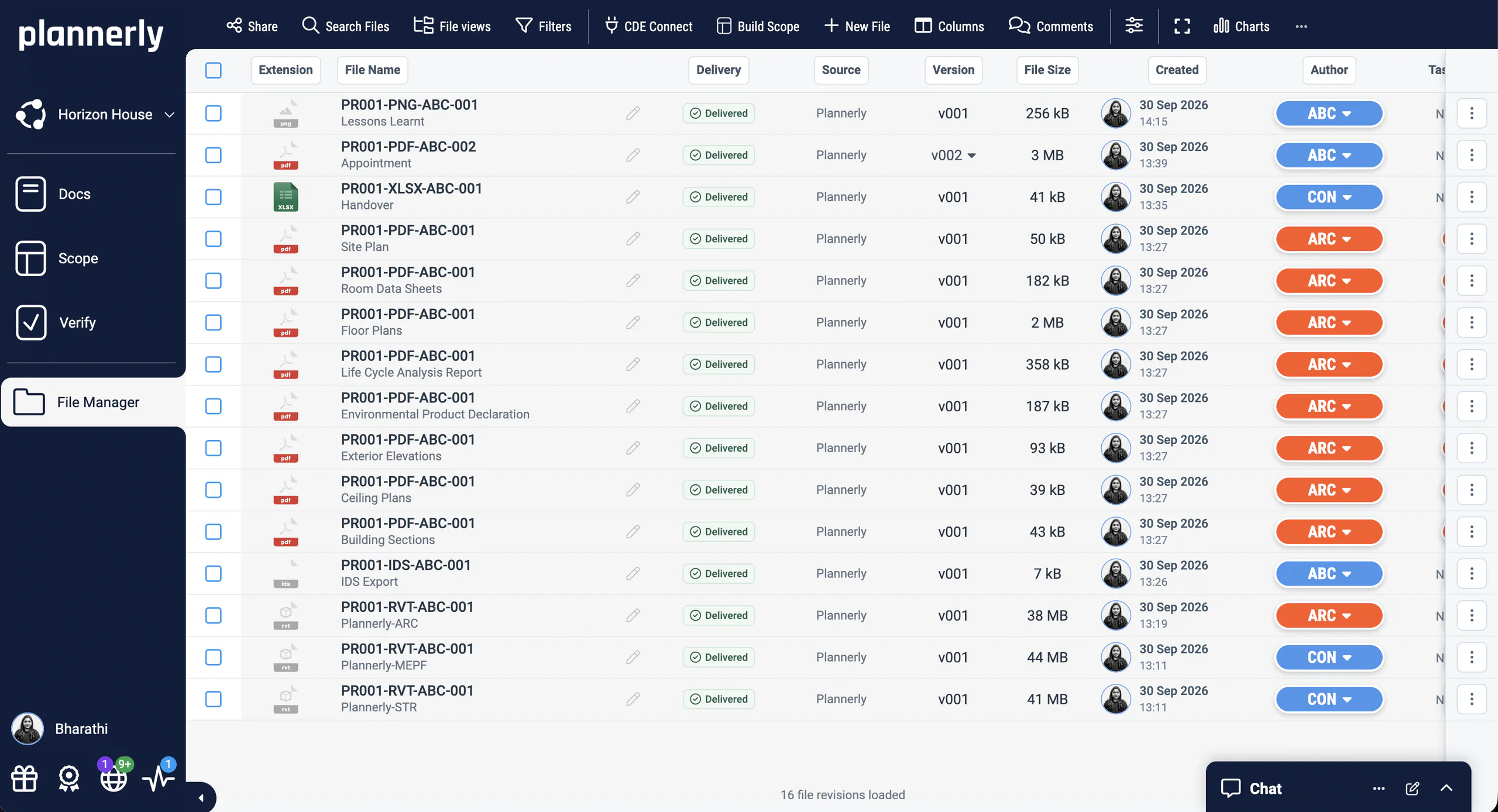
Stop downloading files from one system to upload them to another. CDE Connect syncs the folders you pick from Autodesk, Procore, SharePoint, OneDrive, Dropbox, Box or Egnyte. Delivered files fill the matching requests in your plan, and File Manager shows what's been requested, what's been delivered and what's still outstanding.

  • Every delivered file with its source, version and author
  • Requested and delivered files compared, team by team
See how CDE Connect works
Plannerly File Manager for Horizon House: the handover files, every one delivered, each with its source, version, size, creation date and author

Model checks

Teams check their own models before they send them

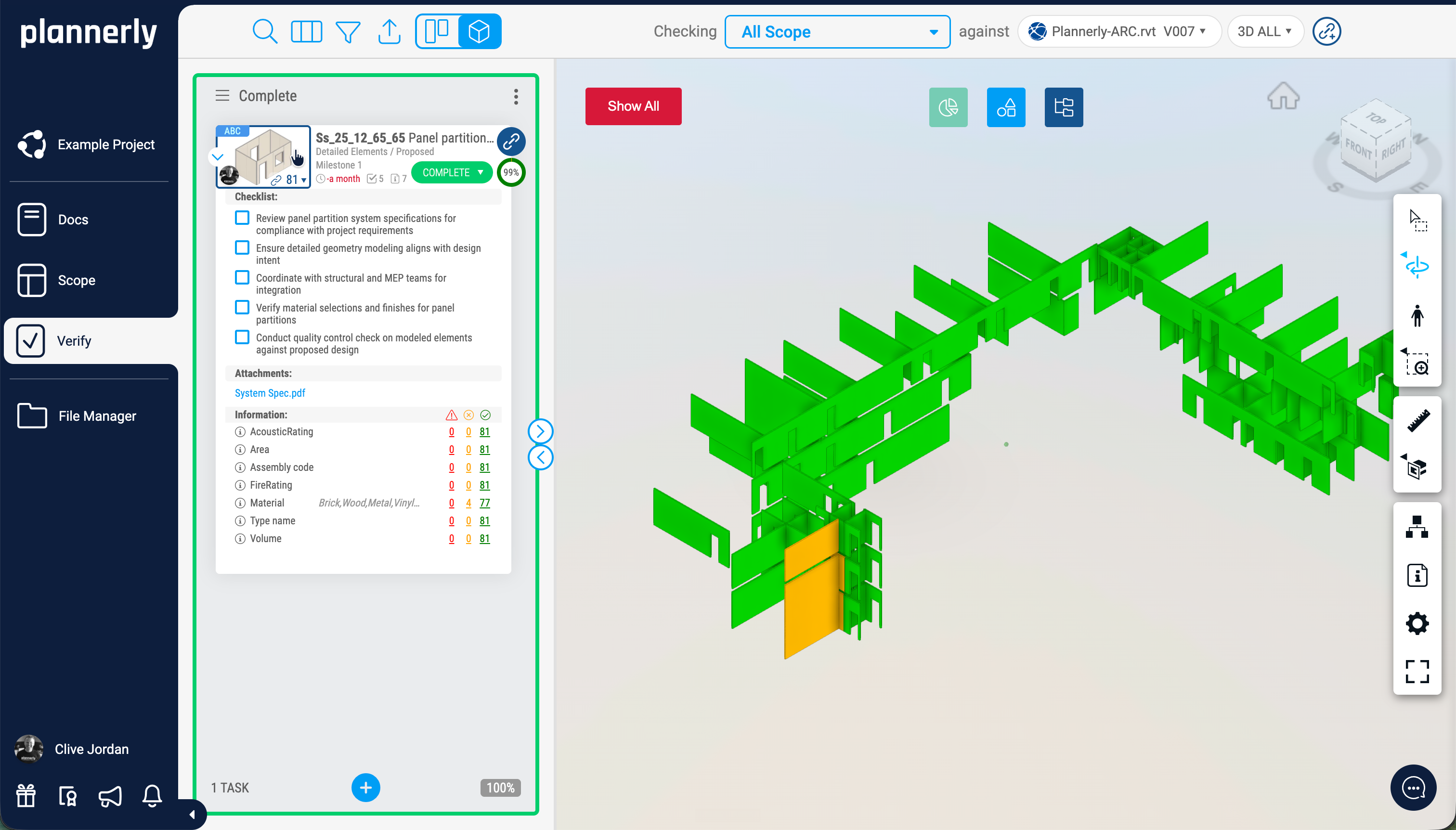
Export your requirements as an IDS file and authors check their models before they submit. Verify then checks every delivered model against the same requirements, element by element, and each team sees exactly what it needs to fix - so you're not the one sending the list back.

See how model checking works
Plannerly Verify: a panel partition task checked against the architectural model at 99%, with its checklist and a pass count for each required property, beside the 3D model with passing walls in green and one flagged in amber

Start with one problem

You don't have to do everything - just fix your biggest pain first

Run the MIDP

Start here if task teams don't know what to deliver, or when. Every deliverable named, owned by one team and tracked, without a spreadsheet to keep alive.

Scope

Agree the RACI

Start here if nobody's sure who's accountable. One accountable company per task, agreed by the people named in it, with a contract each team signs for its own part.

Scope

Write the BEP

Start here if the BEP is a Word file nobody reads. Go from the tender promise to a plan every team agrees and works to.

Docs

Set the information requirements

Start here if your requirements are a PDF the supply chain skims once. Set OIR, AIR and EIR they can check their work against.

Scope

Check models with IDS

Start here if models keep arriving without the data you asked for. Every model checked against your requirements, element by element, before you accept it.

Verify

Connect your CDE

Start here if you download files from one system to upload them to another. Delivered files fill the plan, and the charts update by themselves.

File Manager

Scope LOD and LOIN at scale

Start here if your LOD matrix is a spreadsheet nobody can read. Who models what, to what level and by when, for every element on one grid.

Scope

Start the BEP from the EIR (AI can draft it)

Start here if you're answering a client's EIR against the clock. Answer it section by section from the template - AI can draft the first answers for you to edit and agree.

DocsAI

Make it your company standard

Start here if every project starts from last job's copy. Your best BEP, requirements and scope become templates for every new project.

Docs

How it works

One simple workflow: plan the documents, scope the work, verify the models, manage the files

  1. Plan the documents

    Write the EIR, BEP and contracts in Docs, starting from ISO 19650 templates. Write each section yourself or let AI draft a first version; every section has an owner, and sign-off is built in with e-signatures.

    Documents everyone has agreed
  2. Scope who delivers what

    Every element, deliverable and requirement on one visual grid, by milestone, from LOD to level of information need. Give each line one owner, and it becomes the MIDP and every team's TIDP.

    An owner on every line
  3. Verify every model

    Upload IFC, Revit and other models, or sync them from Autodesk Construction Cloud. Each one is checked against your requirements, and the dashboards update as teams fix what failed.

    Problems found before handover
  4. Manage the files

    File Manager keeps every delivered file with its source, version and author, and CDE Connect keeps it in step with your CDE, so the handover is the files the team actually shared.

    A handover you can check

The full demo

See the full BIM management workflow in 25 minutes

Watch the walkthrough

How the documents, the scope and the model checks work together

A complete walkthrough of how Plannerly takes the BIM admin off your desk: ISO 19650 BEPs, EIRs and contracts, then LOD, LOIN, responsibilities and milestones, then models checked automatically with their status tracked. Start free and follow along.

Reviews

Trusted by BIM managers, auditors and digital leaders

What people say about Plannerly, and how it's helping them get control of BIM information management.

  • 5 out of 5

    It's a great platform. I can't imagine managing projects without Plannerly.
    Brad WBIM Manager · Amazon
  • 5 out of 5

    I feel like I work at Disneyland when I show off Plannerly. It's so simple and visual!
    Cindy BaldwinPresident · VDCO Tech
  • 5 out of 5

    Plannerly is easy to put together, organize, view, and customize - and inviting team members is simple. It's changed how we manage project information.
    Darren RCorporate VDC Director · Bernard's Contractors
  • 5 out of 5

    Plannerly is both a tool and a process. It gives my teams an advantage over the competition.
    Chris EveristBIM Manager · BNBuilders
  • 5 out of 5

    Our design teams, PMs, and Clients love the clarity that Plannerly brings!
    Matthew FullerBIM Program Lead · Texas Instruments
  • 5 out of 5

    Plannerly cut the time we spent tracking scope and verifying models by 60%.
    Jonathan GriffithsSenior VDC Engineer · reiSource
  • 5 out of 5

    Plannerly makes our conversations easier, it makes buy-in easier. It's a great basis of conversation and agreement.
    Jeff ThompsonAssistant Director · Broward County
  • 5 out of 5

    It gives structure. It restructures everything. Everyone knows what they have to do.
    András Ábele-NagyHead of BIM · BuildEXT
  • 5 out of 5

    Compliance checks used to be a black box. Now, every requirement is traceable and auditable.
    John KiongDirector, Future of Building & Infrastructure · JTC Corporation
  • 5 out of 5

    Plannerly accelerated our standards creation and virtually eliminated the burden to get updates to end users.
    John RussoPresident · USIBD
  • 5 out of 5

    Everyone was able to work from different countries in a collaborative way online.
    Sean PillanRegional Design Technology Manager · Gensler

What an auditor says

An ISO 19650 auditor on the clients who use Plannerly

It's always a dream to audit a client who has adopted Plannerly.
Austin GibbonsISO 19650 Auditor, Simply Certification

Case studies

Teams that measured the difference

Less admin, faster model checks and a lot less spreadsheet chaos, in their own numbers.

  • Hungary

    70% less admin

    BIM management time saved

    70% less admin, zero spreadsheet chaos

    SODArchitects · Architecture

    Cut over 70% of BIM administration time with reusable templates and a workflow that replaces Dropbox, SharePoint, and scattered spreadsheets.

    Plannerly saved us a lot of time and hassle. We'd highly recommend it to anyone managing BIM projects.
    Ivo Galantai, CEO · SODArchitects
    • SME
    • BEP
    • Templates
  • Singapore

    95% faster

    Model validation time

    From 11,000 Excel rows to automated checks

    JTC Corporation · Government agency

    Eliminated 11,000 Excel rows and automated compliance checks across 2,000+ object types and 27 model categories with Plannerly's Verify module.

    Before Plannerly, it took weeks to do model checks. Now we do it in hours.
    John Kiong, Director · JTC Corporation
    • ISO 19650
    • Verify
    • Government
  • Portugal

    $4.5M / €4M

    Saved · 310,000 sqm project

    How one team saved over $4.5 million

    LIMSEN Consultants · BIM management

    Coordinated 50 companies and 45 BIM models on one of Portugal's largest mixed-use developments. BEP planning time dropped from 100+ hours to under 30.

    Using Plannerly was a cornerstone for us. There is no going back.
    Filipe Lima, Managing Partner · LIMSEN
    • 50 companies
    • ISO 19650
    • BEP

See all case studiesOwners, design teams, contractors, consultants and educators - filter them by your kind of organisation.

Questions

Plannerly demo questions, answered

What happens in a Plannerly demo?
Someone from the Plannerly team walks you through Plannerly live, for 30 minutes, shaped around your project. Tell us what you're working on - a BEP to write, a MIDP to run, models to check - and we'll show you how it works on that job. It's free, and there's nothing to prepare. Book a time.
Can I watch a demo without booking a call?
Yes. Watch Plannerly in one minute or the full 25-minute walkthrough on this page, or start free and follow along in your own account. The use cases show each job step by step, many with the replay of a free webinar that builds it live.
What is Plannerly?
Plannerly is a BIM management platform built around ISO 19650. You write the project documents in Docs, plan who delivers what and when in Scope, check every model against your requirements in Verify and keep the files in File Manager, with templates for the paperwork (AI can draft it) and charts that update themselves. What Plannerly does.
Do I have to use every module?
No. Most teams start with one: Docs for the BEP, Scope for the MIDP and the LOD or LOIN matrix, or Verify for model checking. Pro is priced per project on the modules you choose, so you pay for what you use and add more when you're ready. Compare plans.
Is Plannerly free to start?
Yes. The Free plan covers your first five projects, with Docs, Scope and Verify to explore, no card and no expiry date. When you need more, start a 14-day Pro trial from your account - no card, nothing to cancel - and pay per project when you're ready. See pricing.
Do the other companies on my project have to pay?
No. They join your project at no cost to them. On Pro, editors and viewers are unlimited, so every task team can work in the plan. On Free you're the editor, and everyone you invite can view the plan and comment on it. Compare the plans.
Will Plannerly chase my task teams for me?
It does the reminding you'd otherwise do by hand. Everyone assigned to a task is reminded 7 days before it starts, 3 days before it's due and again if it's overdue, and you can adjust the timings. The charts update as statuses change and files arrive, so they show what's outstanding without anyone keeping a tracker. You still decide what to do about a late team - you just stop being the one who has to notice. Run the MIDP.
Is Plannerly ISO 19650 compliant?
Software can't be compliant on its own - your organisation and your projects are. Plannerly follows the ISO 19650 workflow, from the information requirements to the BEP, MIDP, responsibility matrix, model checking and handover, so you have the structure and the evidence an audit asks for. ISO 19650 explained.
Does Plannerly work with my CDE?
Yes. CDE Connect, in File Manager, syncs the folders you pick from Autodesk, Procore, SharePoint, OneDrive, Dropbox, Box or Egnyte. Delivered files fill the matching requests in your plan, models are checked automatically and the charts update. Connecting a CDE is part of Pro, and you can try it free for 14 days. Connect your CDE.
Can I learn ISO 19650 before I start?
Yes. Plannerly's training is free, with a certificate for every course, from Level 1 BIM Management Basics to Level 3 ISO 19650 Expert. Each use case links the lesson for its steps. Start the free training.

See it on your own project

Book a free 30-minute live demo and tell us the job you're stuck on. Or start free, pick one problem and invite the teams who own it.

Free plan · No card · Everyone you invite joins free

Sign in to keep your progress

Use your Plannerly account - the same email and password as the app. Every lesson stays open either way.

Learned with a different email? Sign in to that account here and we'll bring its courses, progress and certificates into the one you're signed in with. Certificate links and QR codes keep working.

Forgot that password? Reset it first, then come back. Want to keep the other account instead? Sign out and sign in with that one.