
Use cases RACI and team contracts
Use case - RACI and team contracts
Stop chasing work nobody owns: agree the RACI and get each team to sign for its part
A RACI matrix, or responsibility matrix, shows who is Responsible, Accountable, Consulted and Informed for each deliverable. Under ISO 19650 it sets out which task team delivers what, and when. In Plannerly the RACI sits on the work itself, each team signs for its own part, and deliveries are tracked against it.
When a deliverable goes missing, know which company was accountable and that it signed up to it. Each appointed party gets a contract with only its own work, and the evidence of what it delivered builds up against the plan you agreed.
Stop chasing subcontractors who never agreed to their row. Give every deliverable one accountable subcontractor and send each one a contract with only its own work, RACI and timeline to sign. Role charts show the gaps before work starts.
Settle who designs what before the first model, not at the first clash. Each consultant is accountable for its own deliverables and document sections, reviews them against a deadline and signs a contract with only its part.
Stop rebuilding the RACI for every client. Run it the same way on every project: roles on the tasks, reviews with deadlines, a signed contract per team and evidence of what each one delivered. Task teams join at no cost to them.
Teach accountability on a live project, not a table on a slide. Students assign RACI roles to real tasks, find the gaps, agree a contract per team and track what each one delivered.
Free plan, no card. Task teams never pay to join your project.
The problem
Your RACI matrix is complete. So why are you still chasing everyone?
How it works
Stop arguing about who owns what: make each deliverable accountable, get it signed, keep the evidence
-
Make it accountable
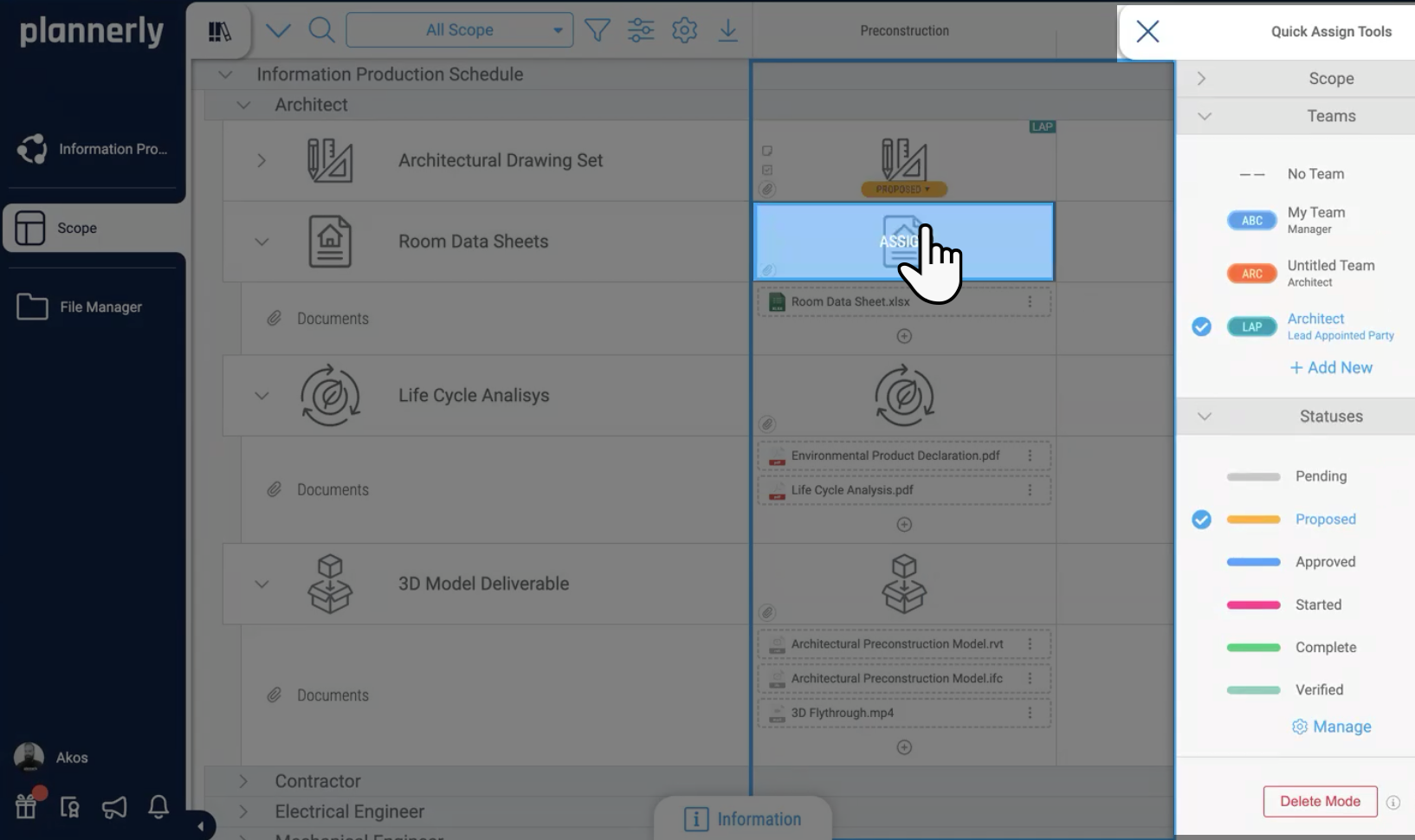
Everyone is Consulted and nobody is Accountable. Put the RACI on the work itself - one accountable team and a responsible person on every task and document section - and role charts show the gaps and doubles.
No gaps, no doubles -
Get it agreed and signed
Silence gets taken as agreement. Bring each team into the documents with a review deadline, then one click makes each team a contract with only its own work, RACI and timeline, sent for e-signature.
Each team signed for its own part -
Keep the evidence
When a deliverable goes missing, nobody can say who owned it. Compare requested and delivered files team by team, each delivery linked to the work it fulfils, and click any chart to see what's outstanding.
Proof of what each team delivered
- Accountable: roles on tasks and document sections
- Agreed: reviews, one-click contracts and e-signatures
- Evidenced: requested versus delivered files
- Preview: asking the project assistant about gaps
9 chapters
Skip to the part you need
- Surviving the RACI00:00
- Why responsibility matrices stop working02:56
- From the MIDP to RACI responsibilities09:11
- Assigning roles and finding gaps12:58
- Reviewing documents and agreeing requirements18:20
- One-Click Contracts and electronic signatures25:42
- Tracking commitments, delivery and dashboards31:35
- Project assistant preview37:27
- Recap and the RACI Survival Kit40:51
Free download
Don't start from a blank RACI table: get the starter project and the responsibility matrix PDFs, free
RACI Survival Kit: a starter project and the ISO 19650 responsibility matrix PDFs
Skip the blank RACI table. Start from the approach Episode 2 built, with two PDFs from our free ISO 19650 training on who is responsible for what.
- 1 starter project
- 2 PDFs
- Free
RACI starter project
Episode 2's approach as a project of your own: RACI roles on the Scope tasks, document sections ready to review and a contract per team, ready for your own task teams.
Free live webinar · Episode 3
Surviving ISO 19650 Information Requirements with AI
Build it. Connect it. Just ask Javis. Most owners aren't sure what to ask for, and requirements copied from the last job create work nobody needs. Three ways into your project's information requirements - build on the Plannerly API, connect your own AI with Plannerly MCP, or just ask Javis - on one structure your supply chain can check against.
Free webinar on Zoom · 45 minutes · How to survive as a BIM Manager
Thursday 22 October 2026
You'll leave with
- Requirements your supply chain can check against
- The ten building blocks every requirement hangs on
- Questions to ask Javis, Claude and ChatGPT about your project
- The example project and the MCP setup guide
Case studies
Teams that agreed who delivers what
Teams that moved responsibilities out of spreadsheets and into agreements: a design firm that can't imagine writing a BIM contract in Word again, 50 companies coordinated on one development, and cross-company conversations months before they would have caused problems.
For owners the payoff is accountability you can see: on one $130M project the process prompted cross-company conversations months before they would have caused problems.
Contractors get every company agreeing its part up front: one team coordinated 50 companies and 45 BIM models on one of Portugal's largest developments.
Design teams trade Excel and Word for agreements every consultant reads: BuildEXT did it while growing from 6 people to 50+ engineers.
Consultants run the same agreed, signed-for structure for every client: LIMSEN coordinated 50 companies and cut BEP planning from 100+ hours to under 30.
These are the agreements your students will meet on real projects: the same roles, the same contracts, the same evidence.
-
 Hungary

8x growth
6 → 50+ engineers · −10% costs
From Excel chaos to ISO 19650 at scale
BuildEXT · General design firm
Grew from 6 employees to 50+ engineers across 4 departments. Now handles projects 30x larger with 10% lower construction and FM costs.
I cannot imagine using Excel or Word to start writing a BIM contract anymore.
András Ábele-Nagy, Head of BIM · BuildEXT -
 Portugal

$4.5M / €4M
Saved · 310,000 sqm project
How one team saved over $4.5 million
LIMSEN Consultants · BIM management
Coordinated 50 companies and 45 BIM models on one of Portugal's largest mixed-use developments. BEP planning time dropped from 100+ hours to under 30.
Using Plannerly was a cornerstone for us. There is no going back.
Filipe Lima, Managing Partner · LIMSEN -
 United States
53% fewer clashes
$130M residential project
53% fewer clashes on a $130M project
Major Real Estate Developer · 800+ O&M team
A $130M apartment project achieved 16.5% time savings and 53% fewer clashes, with 98% of constructability issues solved vs 31% on the control project.
The Plannerly process prompted critical cross-company conversations months before they would have caused problems.

See all case studiesOwners, design teams, contractors, consultants and educators - filter them by your kind of organisation.
What owners say
Owners on knowing who's accountable
5 out of 5
Plannerly makes our conversations easier, it makes buy-in easier. It's a great basis of conversation and agreement.
Jeff ThompsonAssistant Director · Broward County 5 out of 5
Our design teams, PMs, and Clients love the clarity that Plannerly brings!
Matthew FullerBIM Program Lead · Texas Instruments


What contractors say
Contractors on getting every company to agree
5 out of 5
Plannerly is both a tool and a process. It gives my teams an advantage over the competition.
Chris EveristBIM Manager · BNBuilders 5 out of 5
Plannerly cut the time we spent tracking scope and verifying models by 60%.
Jonathan GriffithsSenior VDC Engineer · reiSource


What design teams say
Design teams on knowing who does what
5 out of 5
It gives structure. It restructures everything. Everyone knows what they have to do.
András Ábele-NagyHead of BIM · BuildEXT 5 out of 5
Everyone was able to work from different countries in a collaborative way online.
Sean PillanRegional Design Technology Manager · Gensler

What consultants say
Consultants on running the RACI for clients
5 out of 5
When you're helping governments go digital, you need a platform teams actually understand. That's Plannerly.
Voon LokManaging Director · AdRem IT Solutions 5 out of 5
I feel like I work at Disneyland when I show off Plannerly. It's so simple and visual!
Cindy BaldwinPresident · VDCO Tech


What educators say
Educators on teaching accountability
5 out of 5
Students love Plannerly and it makes my life so much easier!
Petro KaranxhaProfessor · George Brown College 5 out of 5
Many software companies get this wrong. They don't create content or videos. You can't ask me to bring your tool into my curriculum when there's nothing for students to learn from. Plannerly has all of that.
Dr. Zulfikar AdamuAssociate Professor · London South Bank University


Setup guides
Set up your RACI in Plannerly, step by step
Short Help Center guides that walk you through each step in Plannerly. Open one beside the app and follow along.
Start here
Accountable
Agreed
Evidenced

Learn it properly
Level 3 - ISO 19650 Expert
Creating the Detailed Responsibility Matrix
Free lessons
Learn the RACI properly, one short lesson at a time
 Level 3 lesson - roles
ISO 19650 Roles and Responsibilities Explained
Who the appointing party, the lead appointed party and the task teams are, and what each one is accountable for.
 Boot Camp lesson - contracts
The Secret to BIM Accountability: Structured Collaborative Contracts
How responsibility matrices and work packages turn into contracts each team actually reads and signs.
 Level 2 lesson - tracking
Tracking Project Progress and Delivery
How to see what each team has delivered against what it agreed, without building a report by hand.
Level 3 - free certificate
ISO 19650 Expert
The whole ISO 19650 process, responsibility matrices included, with a free certificate. 16,600+ people have taken our free training, rated 4.9 out of 5 from thousands of ratings.
Read more
RACI matrix examples and guides
RACI matrix examples
Three examples you can copy: information management, design responsibility and model checking.
ExamplesCreating a responsibility matrix
How the matrix is structured, and how to build one from scratch or from a CSV.
GuideRun the MIDP
The delivery plan your RACI sits on: every deliverable named, dated and owned.
Use caseAssign document responsibilities
Who writes, reviews and approves each part of a document, tracked section by section.
GuideBIM coordinator roles and responsibilities
What a BIM coordinator does, and where the role sits next to the BIM and information manager.
GuideThe BIM execution plan template
The BEP where the high-level responsibility matrix lives, already structured for ISO 19650.
TemplateLearn ISO 19650 step by step
Free PDFs and videos for every step, roles and responsibility matrices included.
Free PDFsQuestions
RACI and responsibility matrix questions, answered
What is a RACI matrix in BIM?
What is a responsibility matrix under ISO 19650?
What's the difference between Accountable and Responsible?
What's the difference between a RACI matrix and a design responsibility matrix?
Do I still need a separate RACI spreadsheet?
How do I stop everyone being marked as Consulted?
Can each team sign only its own part of the plan?
What happens when a signed contract needs to change?
Is there a free RACI matrix template?
Who is responsible for the responsibility matrix in ISO 19650?
Will Plannerly remind each team about its own deliverables?
Can I run the RACI on the Free plan?
Pricing
Start free, then pay per project when you're ready
- Five projects included
- The account owner edits; everyone they invite can view
- 100 MB of project files
- Explore Docs, Scope and Verify
- You assign the roles, and everyone you invite can view and comment
- Five projects included
- Unlimited editors and viewers
- 50 GB of project files
- Your branding on everything you export
- Each project beyond five: $49 a month
- Every task team edits its own lines, at no cost to them
- Unlimited e-signatures, so each team signs its own contract
- Try every Pro feature free for 14 days, model checking included, no card
Prices in US dollars. You'll see the price for your country in the app.