
Use cases Information requirements
Use case - information requirements
Set information requirements your supply chain can check against
Information requirements say what information a client needs, when, and why. Under ISO 19650 the OIR sets the goals, the AIR and PIR turn them into asset and project needs, and the EIR tells each appointed party what to deliver at each exchange. In Plannerly they become one list every model is checked against.
Stop finding the gaps at handover. Ask for exactly the information you'll use to run the asset, and say why. Your OIR, AIR and EIR become one list, staged by milestone, that every appointed party signs for and every model is checked against.
Stop guessing what the client's EIR really wants. Split it into requirements each subcontractor can meet, by team and milestone, issue each one as a PDF, a spreadsheet or an IDS file, and check the models before they go to the client.
Stop modelling what nobody asked for. See what the client needs for each element at each stage before you model it, with the rule that checks it, so your team delivers what's asked and can show it.
Stop rewriting requirements for every client. Start from ISO 19650 templates, the buildingSMART Data Dictionary or your own library, stage them by milestone, and hand your client requirements the supply chain can check.
Teach information requirements as a working system, not a list of acronyms. Students build the OIR, AIR and EIR for a real project, stage them by milestone and check a model against them.
Free plan, no card. Task teams never pay to join your project.
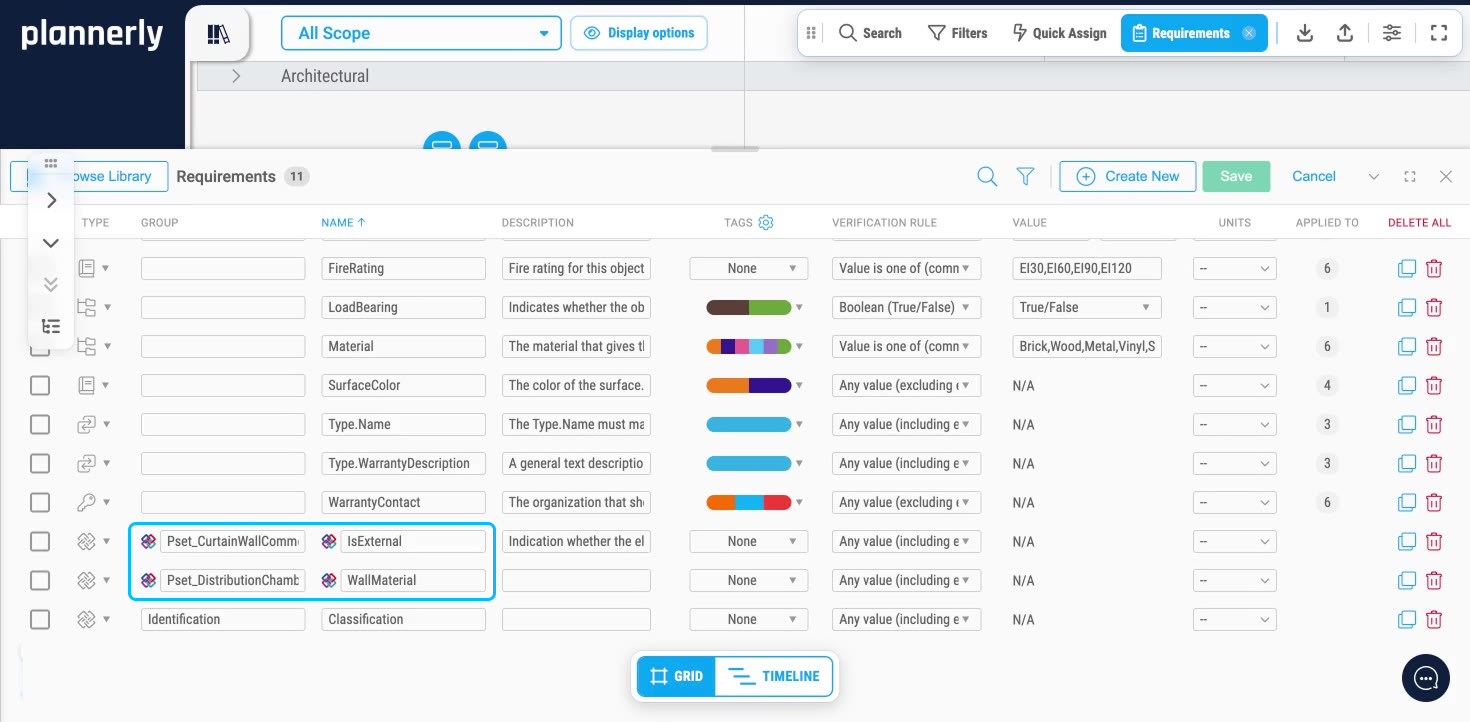
The problem
The EIR asks for everything, so nobody can check what was delivered
How it works
Stop issuing an EIR nobody can check: start from the purpose, build one list, stage it, then check what arrives
-
Start from the purpose
Requirements copied from the last job ask for everything and explain nothing. Write the OIR from an ISO 19650 template: what your organisation needs to know to run its assets, and why.
Requirements with a reason behind them -
Build one list
Five spreadsheets never agree. In Scope, list the assets and elements and add the information each one needs - from the library, the buildingSMART Data Dictionary, a CSV or by hand - each with the rule that checks it.
One structured list instead of five spreadsheets -
Stage it by milestone
Ask for everything on day one and teams model what nobody needs yet. Assign each requirement at the information exchange where it's needed, with the level of information need for that stage.
The right information at the right exchange -
Issue it to be checked
A PDF can't check a model. Give each task team its own requirements as a PDF, a spreadsheet or an IDS file, have them signed, and check the models that come back against the same rules in Verify.
Requirements every team can check against
Free live webinar · Episode 3
Surviving ISO 19650 Information Requirements with AI
Build it. Connect it. Just ask Javis. Most owners aren't sure what to ask for, and requirements copied from the last job create work nobody needs. Three ways into your project's information requirements - build on the Plannerly API, connect your own AI with Plannerly MCP, or just ask Javis - on one structure your supply chain can check against.
Free webinar on Zoom · 45 minutes · How to survive as a BIM Manager
Thursday 22 October 2026
You'll leave with
- Requirements your supply chain can check against
- The ten building blocks every requirement hangs on
- Questions to ask Javis, Claude and ChatGPT about your project
- The example project and the MCP setup guide
Free download
Don't copy the last job's EIR: get a starter requirements project and the EIR, OIR and AIR PDFs, free
Information Requirements Survival Kit: a starter project and the EIR, OIR and AIR PDFs
Stop copying the last job's EIR. Start from a requirements project for Plannerly, with the EIR, OIR and AIR explained in three PDFs from our free ISO 19650 training.
- 1 starter project
- 3 PDFs
- Free
Information requirements starter project
OIR and EIR documents in Docs and a structured requirements list in Scope, staged by milestone and ready for your own assets and task teams.
Case studies
Teams that turned requirements into checks
Owners and designers who made their requirements checkable: 11,000 Excel rows replaced by automated checks, government model data checked against defined requirements, and structured BIM requirements across a global portfolio.
For owners the payoff is certainty at every exchange: JTC Corporation replaced 11,000 Excel rows with automated checks and cut model validation time by 95%.
Contractors know what their models will be checked against: Queensland's Department of Transport and Main Roads checks supply-chain model data against defined information requirements.
Design teams get requirements they can see and meet: Foster + Partners uses Plannerly to manage structured BIM requirements across its global portfolio.
Consultants turn requirements into a standard their clients can check: JTC automated compliance checks across 2,000+ object types and 27 model categories.
These are the requirements your students will be checked against on real projects: structured, staged and checked by software, not by eye.
-
 Singapore

95% faster
Model validation time
From 11,000 Excel rows to automated checks
JTC Corporation · Government agency
Eliminated 11,000 Excel rows and automated compliance checks across 2,000+ object types and 27 model categories with Plannerly's Verify module.
Before Plannerly, it took weeks to do model checks. Now we do it in hours.
John Kiong, Director · JTC Corporation -
 Australia
Government QA
Model data checked against information requirements
Government model checking for transport infrastructure
Queensland Department of Transport and Main Roads · Government owner
Queensland's Department of Transport and Main Roads uses Plannerly Verify to check supply-chain model data against defined information requirements, giving the team more certainty that model deliverables contain the information they expect.
It highlights the need for due diligence when pulling all of the pieces of the puzzle together.
Bryan McSweeney, Manager - Special Projects · TMR -
 United Kingdom

Global practice
World-leading architecture studio
Making global BIM scope visible
Foster + Partners · Architecture
One of the world's most celebrated architecture studios uses Plannerly to manage structured BIM requirements across their global portfolio of landmark projects.
Trusted by one of the world's most iconic architecture practices to manage BIM requirements at a global scale.

See all case studiesOwners, design teams, contractors, consultants and educators - filter them by your kind of organisation.
What owners say
Owners on getting the requirements right
5 out of 5
It highlights the need for due diligence when pulling all of the pieces of the puzzle together to make sure there are no errors in the definition of our information requirements.
Bryan McSweeneyManager - Special Projects, Digital Systems · Queensland Department of Transport and Main Roads 5 out of 5
Compliance checks used to be a black box. Now, every requirement is traceable and auditable.
John KiongDirector, Future of Building & Infrastructure · JTC Corporation
What contractors say
Contractors on checking models against requirements
5 out of 5
Plannerly cut the time we spent tracking scope and verifying models by 60%.
Jonathan GriffithsSenior VDC Engineer · reiSource 5 out of 5
Plannerly is both a tool and a process. It gives my teams an advantage over the competition.
Chris EveristBIM Manager · BNBuilders


What design teams say
Design teams on clear requirements
5 out of 5
It gives structure. It restructures everything. Everyone knows what they have to do.
András Ábele-NagyHead of BIM · BuildEXT 5 out of 5
Everyone was able to work from different countries in a collaborative way online.
Sean PillanRegional Design Technology Manager · Gensler


What consultants say
Consultants on requirements as a standard
5 out of 5
Plannerly accelerated our standards creation and virtually eliminated the burden to get updates to end users.
John RussoPresident · USIBD 5 out of 5
When you're helping governments go digital, you need a platform teams actually understand. That's Plannerly.
Voon LokManaging Director · AdRem IT Solutions


What educators say
Educators on teaching requirements in practice
5 out of 5
Many software companies get this wrong. They don't create content or videos. You can't ask me to bring your tool into my curriculum when there's nothing for students to learn from. Plannerly has all of that.
Dr. Zulfikar AdamuAssociate Professor · London South Bank University 5 out of 5
Students love Plannerly and it makes my life so much easier!
Petro KaranxhaProfessor · George Brown College


Setup guides
Set up your information requirements in Plannerly, step by step
Short Help Center guides that walk you through each step in Plannerly. Open one beside the app and follow along.
Purpose
Build
Stage
Issue
Check

Learn it properly
Level 3 - ISO 19650 Expert
(EIR) Exchange Information Requirements
Free lessons
Learn the OIR, AIR, PIR and EIR properly, one short lesson at a time
 Level 3 lesson - the OIR
(OIR) Organizational Information Requirements
What an OIR is, who writes it, and how it sets the goals every other requirement traces back to.
 Level 3 lesson - the AIR
(AIR) Asset Information Requirements
How to list the assets you'll operate and maintain, and the data you need on each one.
 Level 2 lesson - in Plannerly
Setting Information Requirements
How to set clear requirements in Plannerly with visual scope, milestones and IDS, so teams know what to deliver.
Level 3 - free certificate
ISO 19650 Expert
The OIR, AIR, PIR and EIR in the whole ISO 19650 process, with a free certificate. 16,600+ people have taken our free training, rated 4.9 out of 5 from thousands of ratings.
Read more
OIR, AIR, PIR and EIR guides and templates
ISO 19650 templates: EIR, OIR, AIR and more
Free templates for every ISO 19650 requirement document, with a lesson on each one.
TemplatesLearn ISO 19650 step by step
Free PDFs and videos on the OIR, AIR, PIR and EIR, and every step that follows them.
Free PDFsHow to build information requirements
Adding requirements from the buildingSMART Data Dictionary and property libraries, and keeping them organised.
GuideCreate EIR, PIR and BEP documents from templates
Professional requirement documents from Plannerly's template library, with SmartFields doing the retyping.
GuideLevel of information need (LOIN)
How much detail each requirement needs, and when - the ISO 7817 way.
GuideUnderstanding IDS
Information requirements as a file that software can check models against.
GuideThe BIM execution plan template
The BEP that answers your EIR, already structured for ISO 19650.
TemplateCheck models against the requirements
Model checking with IDS: every delivered model checked against what you asked for.
Use caseQuestions
Information requirements questions, answered
What is an EIR (exchange information requirements)?
What's the difference between OIR, AIR, PIR and EIR?
Who writes the EIR?
What goes in an EIR?
What is the OIR in ISO 19650?
What is the PIR in BIM?
What is the AIR?
Is there a free EIR template for ISO 19650?
How do I make information requirements checkable?
What is an appointing party in ISO 19650?
Can AI help write information requirements?
Can I set information requirements on the Free plan?
Pricing
Start free, then pay per project when you're ready
- Five projects included
- The account owner edits; everyone they invite can view
- 100 MB of project files
- Explore Docs, Scope and Verify
- You build the requirements, and everyone you invite can view and comment
- Five projects included
- Unlimited editors and viewers
- 50 GB of project files
- Your branding on everything you export
- Each project beyond five: $49 a month
- Every task team works from the same list, at no cost to them
- Unlimited e-signatures, so each team signs for its requirements
- Try every Pro feature free for 14 days, model checking included, no card
Prices in US dollars. You'll see the price for your country in the app.