Start free

Templates

Free BEP template

A BIM execution plan your teams will actually read

A BIM execution plan (BEP) explains how a delivery team will meet the client's information requirements: who does what, to which standards, with which methods and tools. ISO 19650 asks for one with the tender and a confirmed one after appointment. This free template has both, with an owner on every section.

Free plan, no card needed. The BEP template is in the Library in Docs.

app.plannerly.com
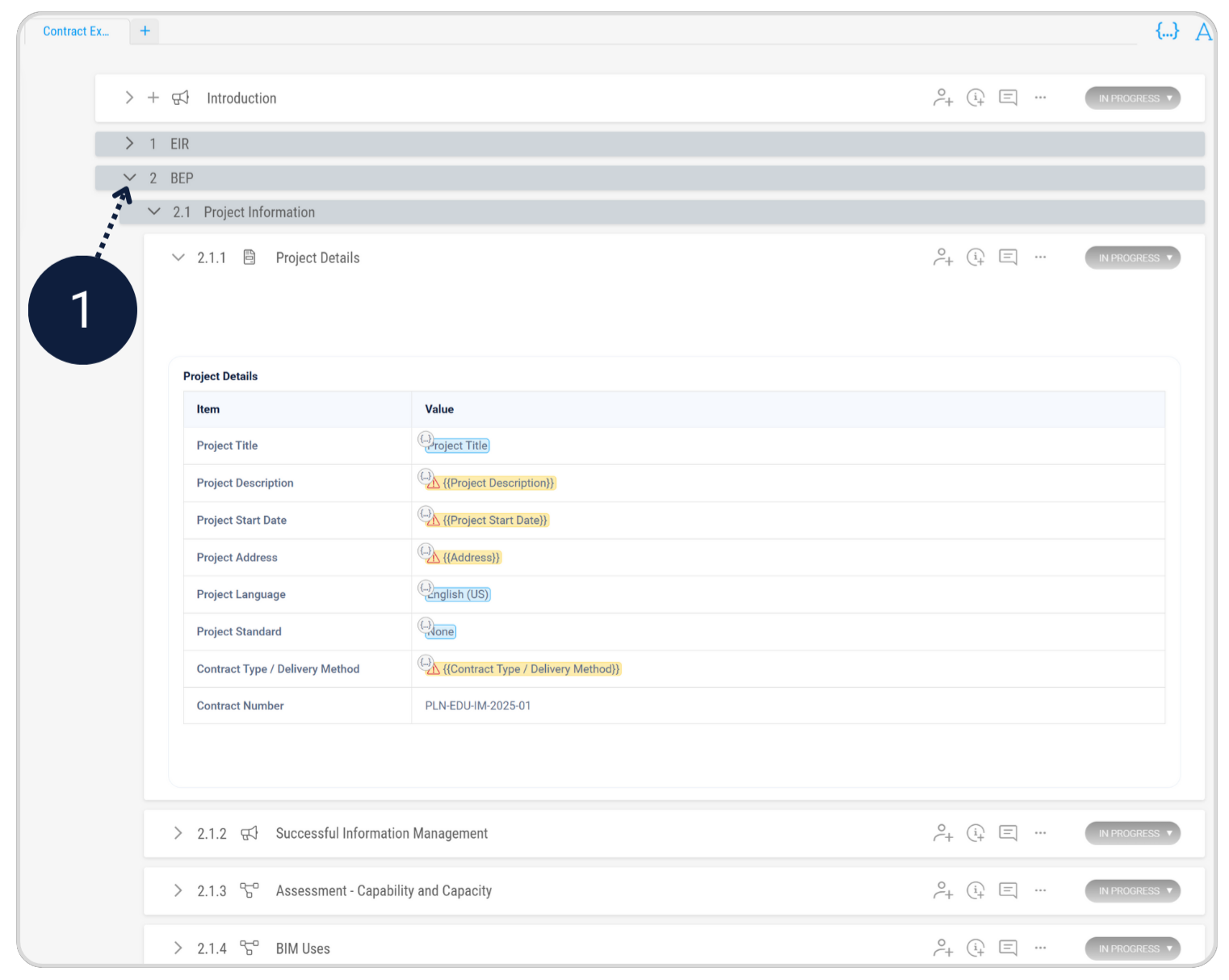
Plannerly Docs: a BIM execution plan open at its project details, filled in with SmartFields, above its sections on information management, capability and capacity, and BIM uses, each with its own status

Sound familiar?

A 60-page BEP copied from the last job, that nobody reads

The problem

It promised the client everything, and nobody agreed to their part

The BEP is written by one person, filed after the tender and never changes. Start from the template, give each section an owner, and keep it live as the project changes, so the plan the team works to is the one it agreed.

What is a BIM execution plan?

The BIM execution plan (BEP) is the delivery team's answer to the client's EIR: how it will manage information on the project, who is responsible for what, which standards, methods and tools it will use, and how it will meet each requirement. ISO 19650-2 asks for it twice - with the tender, and again once the team is appointed. Our BEP guide covers what makes one work.

What's in the BEP template

Pre-appointment BEP, with the tender:

  • the proposed information delivery strategy - how the team will meet the EIR;
  • the proposed federation strategy for the models;
  • a high-level responsibility matrix;
  • any proposed changes to the project's information standard, methods and procedures;
  • the software, hardware and IT the team will use.

Post-appointment BEP, once appointed: the same sections confirmed, the names of the people in the information management roles, and the detailed responsibility matrix and MIDP it relies on.

Pre-appointment or post-appointment BEP?

The pre-appointment BEP is part of the tender: it shows how the team would meet the requirements. The post-appointment BEP is the agreed plan the team works to. Write the first well and the second is a confirmation, not a rewrite. The UK BIM Framework's guidance on tendering and appointments explains the handover between them, and the BEP use case shows the whole job in Plannerly.

How to use it

From template to an agreed BEP in four steps

  1. Answer the requirements

    Open the BEP template in Docs and work through the client's requirements section by section. AI can draft a first version of any section for you to edit.

    No blank pages
  2. Give every section an owner

    Assign each section to the person who knows it, with a deadline, so the BEP isn't one person's job.

    An owner on every section
  3. Point to the live plans

    Keep the responsibility matrix and MIDP in Scope, where they stay current, and refer to them from the BEP instead of pasting tables that go stale.

    A BEP that matches the plan
  4. Share, agree and sign

    Share it with the client and each task team to review by a deadline, then sign it off with e-signatures. Every change is in the version history.

    An agreed, living BEP

Free live webinar · Episode 3

Surviving ISO 19650 Information Requirements with AI

Build it. Connect it. Just ask Javis. Most owners aren't sure what to ask for, and requirements copied from the last job create work nobody needs. Three ways into your project's information requirements - build on the Plannerly API, connect your own AI with Plannerly MCP, or just ask Javis - on one structure your supply chain can check against.

Oct22Thu

Free webinar on Zoom · 45 minutes · How to survive as a BIM Manager

Thursday 22 October 2026

10:00New York 15:00London 18:00Dubai

You'll leave with

  • Requirements your supply chain can check against
  • The ten building blocks every requirement hangs on
  • Questions to ask Javis, Claude and ChatGPT about your project
  • The example project and the MCP setup guide

Fill this in to carry on.

That email doesn't look right - check for a typo.

Free. One sign-up covers every episode this season, and the replay comes to you if you can't make it. We pass your name and email to Zoom to register you, and Zoom sends your link.

You're in.

Your Zoom link is on its way to your inbox. See you on Thursday 22 October 2026.

Free download

The pre- and post-appointment BEP slides and five steps to better BIM management, free

Free download

BEP Survival Kit: a starter BEP and the pre- and post-appointment BEP PDFs

Stop copying the last job's BEP. Start from an ISO 19650 BEP for Plannerly, with three PDFs from our free training on the pre-appointment BEP, the post-appointment BEP and better BIM management.

  • 1 starter project
  • 3 PDFs
  • Free

Case studies

Teams whose BEP became the way they work

  • Hungary

    70% less admin

    BIM management time saved

    70% less admin, zero spreadsheet chaos

    SODArchitects · Architecture

    Cut over 70% of BIM administration time with reusable templates and a workflow that replaces Dropbox, SharePoint, and scattered spreadsheets.

    Plannerly saved us a lot of time and hassle. We'd highly recommend it to anyone managing BIM projects.
    Ivo Galantai, CEO · SODArchitects
    • SME
    • BEP
    • Templates
  • Portugal

    $4.5M / €4M

    Saved · 310,000 sqm project

    How one team saved over $4.5 million

    LIMSEN Consultants · BIM management

    Coordinated 50 companies and 45 BIM models on one of Portugal's largest mixed-use developments. BEP planning time dropped from 100+ hours to under 30.

    Using Plannerly was a cornerstone for us. There is no going back.
    Filipe Lima, Managing Partner · LIMSEN
    • 50 companies
    • ISO 19650
    • BEP
  • Hong Kong

    80% time saving

    BIM & ESG verification

    No more 90-day BIM setup delays

    MTECH Engineering · Digital construction

    Delivered 16+ major projects at Hong Kong International Airport. Setup time dropped from 90 days to 20 days, with ESG goals embedded from day one.

    With Plannerly, we don't just create a plan, we live it. It's how we put the BIM Execution Plan into daily practice.
    Stephen Au, Director · MTECH
    • ESG
    • Airport
    • 16+ projects

See all case studiesOwners, design teams, contractors, consultants and educators - filter them by your kind of organisation.

Questions

BIM execution plan template questions, answered

What is a BIM execution plan?
The plan that explains how a delivery team will manage information on a project: who produces what, to which standards, using which methods and tools, and how it will meet the client's requirements. Under ISO 19650-2 there's a pre-appointment BEP with the tender and a post-appointment BEP once appointed. Our BEP guide covers what to consider.
Is this BEP template ISO 19650 compliant?
It follows the structure ISO 19650-2 expects for both the pre- and post-appointment BEP. Compliance comes from what you write in it and from doing what it says: your project's EIR decides the detail. The Level 3 lesson on the pre-appointment BEP goes through each part.
Can I download the BEP template as Word or PDF?
The free download on this page is a set of PDFs from our free ISO 19650 training: the pre- and post-appointment BEP slides and five steps to better BIM management. The BEP template itself is in the Library in Plannerly Docs; fill it in and export it to PDF or Word to issue it. Start free.
What's the difference between a pre-appointment and a post-appointment BEP?
The pre-appointment BEP is part of the tender: how the team would meet the requirements. The post-appointment BEP is the agreed plan after appointment, with confirmed names, the detailed responsibility matrix and the MIDP. The UK BIM Framework guidance on tendering and appointments explains the step between them.
Can I use my own company's BEP instead?
Yes. Paste or import it from Word and keep its structure, then save it as your company template so every project starts from it. Import documents from templates or other projects, and see how teams make it their company standard.
Can AI write my BEP?
AI can draft a first version of any section from the client's requirements, and you edit it. You stay responsible for what it promises. EIR to BEP with AI shows the whole job, and the Level 1 lesson on AI shows the tools.

Start your BEP from the template, not the last job

Start free, open the BEP template and give every section an owner this week.

Free plan · ISO 19650 aligned · No credit card