Start free

Templates

Free TIDP template

Get every task team's TIDP back in the same format

A TIDP (task information delivery plan) is one task team's ISO 19650 list of the information it will deliver: each container's name, who produces it, its level of information need, dependencies, production time and milestone. Together the TIDPs make the MIDP. This free template gives every team the same structure.

Free plan, no card needed. Every task team you invite joins free.

app.plannerly.com
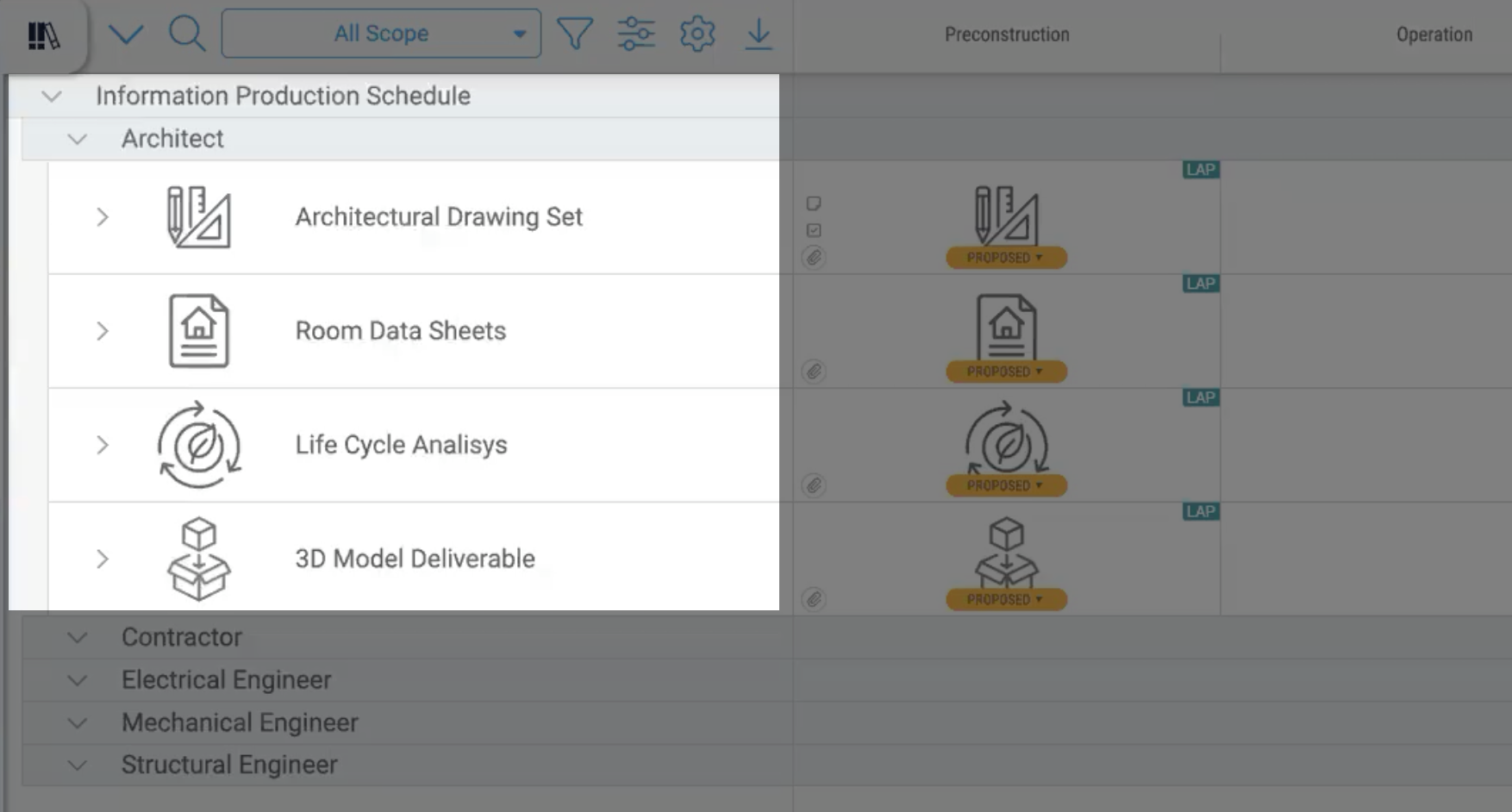
Plannerly Scope: the architect's deliverables in the information production schedule, each with its milestone, team and proposed status, above the other task teams' plans

Sound familiar?

Every task team sends its TIDP in a different format

The problem

A spreadsheet from one team, a PDF from another, an email from the third

You retype them all into the MIDP, and by the time you've finished, two have changed. One structure for every team, in one shared plan, ends the retyping - and each team can see that what it agreed is what's on the plan.

What is a TIDP?

A task information delivery plan (TIDP) is one task team's plan for the information it will produce on an ISO 19650 project. The architect, the structural engineer and each specialist subcontractor write their own. The lead appointed party then brings them together into the MIDP, so the TIDP is where every line of the master plan starts. ISO 19650-2 sets out what it contains.

What goes in the TIDP template

One line per information container the team will deliver, with:

  • the container's name and title, to the project's naming convention;
  • the information author - the person in the team who produces it;
  • its level of information need;
  • its predecessors or dependencies;
  • its estimated production time;
  • the delivery milestone it's due at.

How the TIDPs become the MIDP

On paper, someone merges every team's spreadsheet into one. In Plannerly every team works in the same plan: filter it to one team and you have that team's TIDP; show every team and you have the MIDP. Each team agrees its own lines and signs a contract with only its deliverables, so who's responsible and what's due sit on the same line - the responsibility matrix and the delivery plan in one place. MIDP and TIDP, explained.
How to use it

Fill in the TIDP template in four steps

  1. Set up the task teams

    Invite each task team to the project and give each one its own part of the plan. Invited teams join free.

    One structure for every team
  2. List the team's containers

    The team lists, or pastes in, every model, drawing, schedule and report it will deliver. Each becomes a named file request.

    Every container named
  3. Add levels, dates and links

    Set each container's level of information need, its milestone and dates on the timeline, and link the ones that depend on others.

    A TIDP the MIDP can rely on
  4. Agree it and roll it up

    The team agrees its TIDP and signs a contract with only its own lines. Every TIDP shows in the MIDP straight away.

    The MIDP, without copying rows

Free webinar replay - Episode 1

Watch task teams' plans built into one MIDP, live

How to survive as a BIM Manager, Episode 1: every team's deliverables in one plan, owners and dates agreed, a contract each team signs, and dashboards that update as files arrive.

  • Paste your lists, get every file named
  • Teams, owners and assignment
  • Timeline, dependencies and critical path
  • Each team's contract and e-signatures

Free download

The MIDP and TIDP slides, the responsibility matrix and the whole process on one page, free

Free download

MIDP Survival Kit: a starter project and three ISO 19650 PDFs

Start your MIDP from the project Episode 1 built instead of a blank spreadsheet, with three PDFs from our free ISO 19650 training: the MIDP step, the detailed responsibility matrix and the whole process on one page.

  • 1 starter project
  • 3 PDFs
  • Free

Setup guides

Set up each team's TIDP in Plannerly

Short Help Center guides that walk you through each step in Plannerly. Open one beside the app and follow along.

Questions

TIDP template questions, answered

What is a TIDP in ISO 19650?
A task information delivery plan: one task team's list of the information containers it will deliver, with each one's name, author, level of information need, dependencies, production time and delivery milestone. The TIDPs together make the MIDP. MIDP and TIDP, explained.
Who writes the TIDP?
Each task team writes its own - the people who will actually produce the information - and the lead appointed party brings them together into the MIDP. The Level 3 lesson on the MIDP and TIDP shows who does what. ISO 19650-2 sets out the process.
What's the difference between a TIDP and a MIDP?
A TIDP is one team's plan; the MIDP is every team's plan together, owned by the lead appointed party. In Plannerly a TIDP is the shared plan filtered to one team, so the MIDP is never a copy that drifts. See the MIDP template.
How detailed should a TIDP be?
Detailed enough that someone else could check it: every container named, with its level of information need and the milestone it's due at. If a line can't be checked when it arrives, it's too vague. The responsibility matrix tells each team which containers belong in its TIDP.
Is there a free TIDP template in Excel?
The free download here is a set of PDFs from our free ISO 19650 training: the MIDP and TIDP step, the detailed responsibility matrix and the whole process on one page. The working TIDP lives in Plannerly, where each team fills in its own lines and they appear in the MIDP straight away. Start free.
How do I get task teams to agree their TIDP?
Give them only their own lines to review, settle questions in comments on the line, then send each team a contract with just its deliverables for e-signature. Episode 2 shows it live on the RACI use case, and Invite your task teams covers the setup.

Give every task team the same TIDP to fill in

Start free, invite your task teams and let each one fill in its own lines. The MIDP builds itself from them.

Free plan · ISO 19650 aligned · No credit card