Who does what, agreed and evidenced: ISO 19650 project management in one place
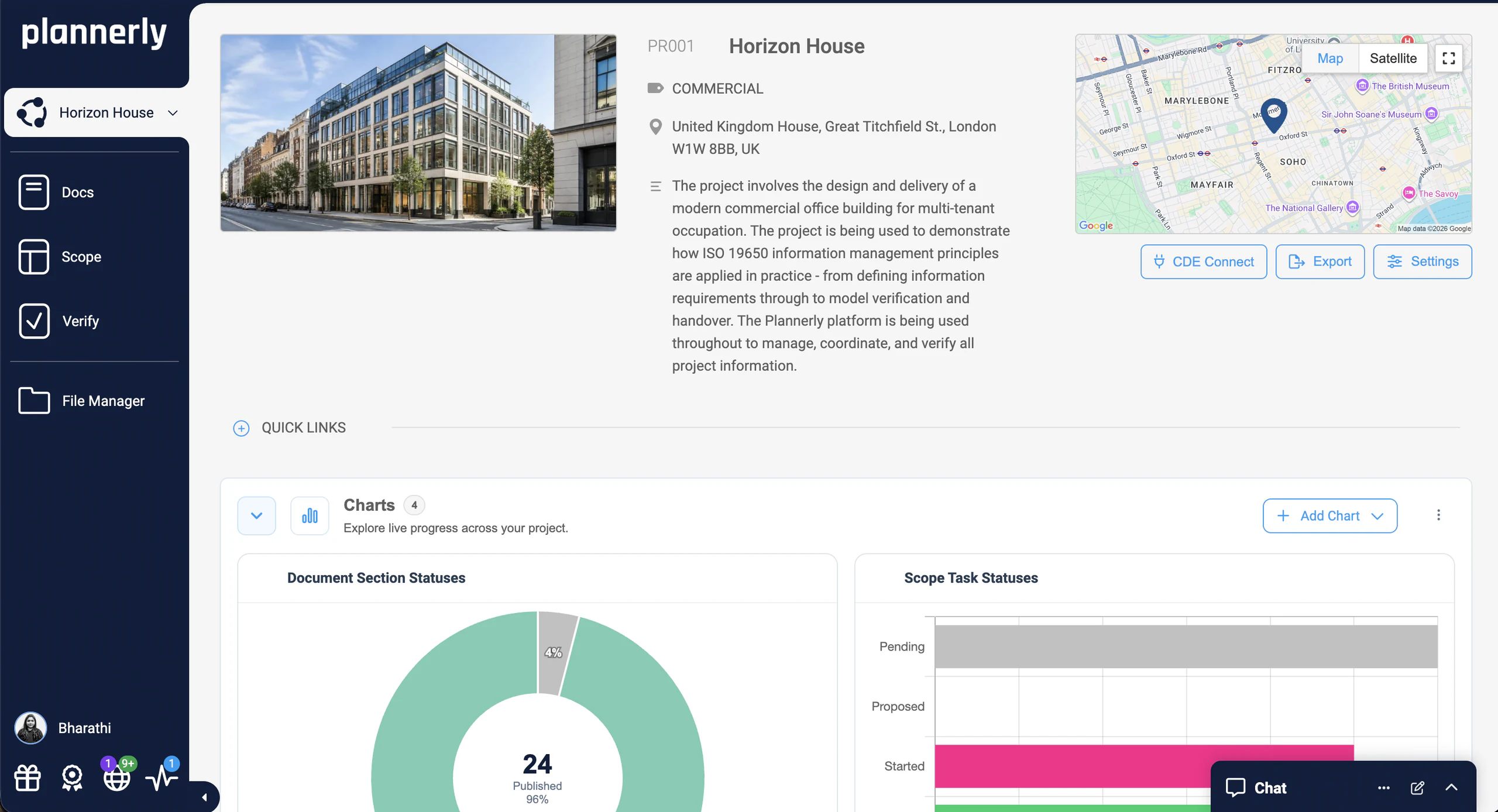
Plannerly is the BIM and ISO 19650 management platform. Write the documents in Docs, plan who delivers what and when in Scope, check every model in Verify and keep the files in File Manager, with templates for the paperwork (AI can draft it) and charts that update themselves.
Set your information requirements once, see every appointed party's plan agreed line by line, and accept only models that carry the data you asked for. The paperwork starts from templates (AI can draft it) and the charts show who has delivered, without chasing anyone.
Get every subcontractor's deliverables owned, agreed and signed in one plan, with dates and reminders. The BEP starts from the client's EIR (AI can draft it), models are checked before they reach your client, and the charts show who is behind before it costs you.
Agree who models what with every consultant, publish a BEP people actually read, and check each model against the client's requirements before you issue it. Files move to and from your Autodesk CDE by themselves.
Turn your method into templates and run every client's ISO 19650 process from them: documents, scope, schedule and model checks in one account, with charts that report progress for you.
Teach ISO 19650 by doing it: free courses with certificates, then a real project in which students write the BEP, plan the deliverables, agree who owns each one and check the model.
Accountability, ISO 19650, AI and a plan people actually follow
Accountability
Know who does what, agreed and evidenced
The responsibility matrix sits in a BEP appendix, everyone is Consulted, nobody is Accountable, and when a deliverable goes missing nobody can say who owned it. In Plannerly every deliverable and document section has one accountable team and a responsible person. Each team signs a contract with only its own work, and delivered files are linked to the work they fulfil, so the evidence builds itself.
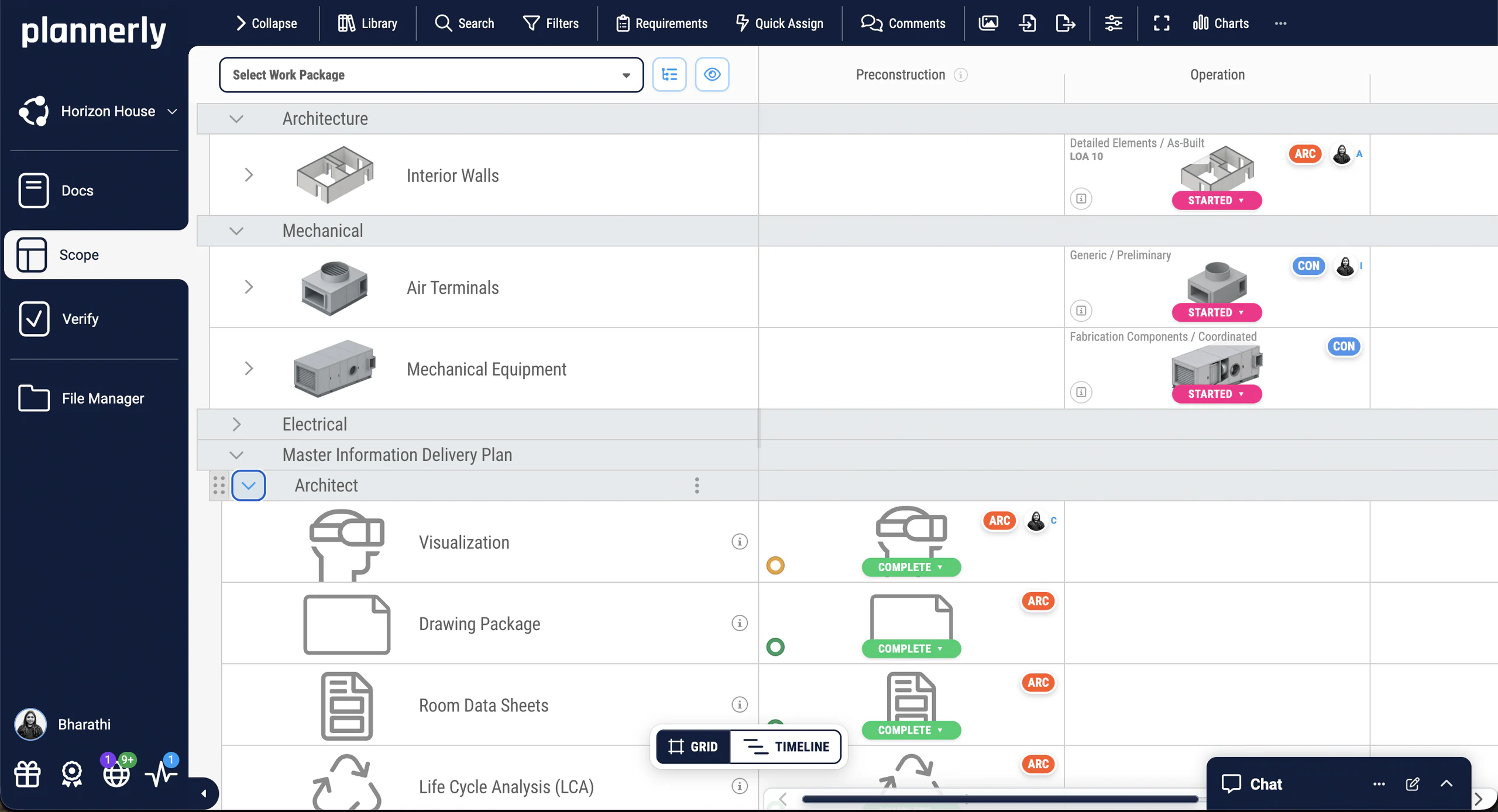
One accountable team and a responsible person on every line
A contract for each team, sent for e-signature
Requested and delivered files compared, team by team
The whole ISO 19650 process, without five spreadsheets
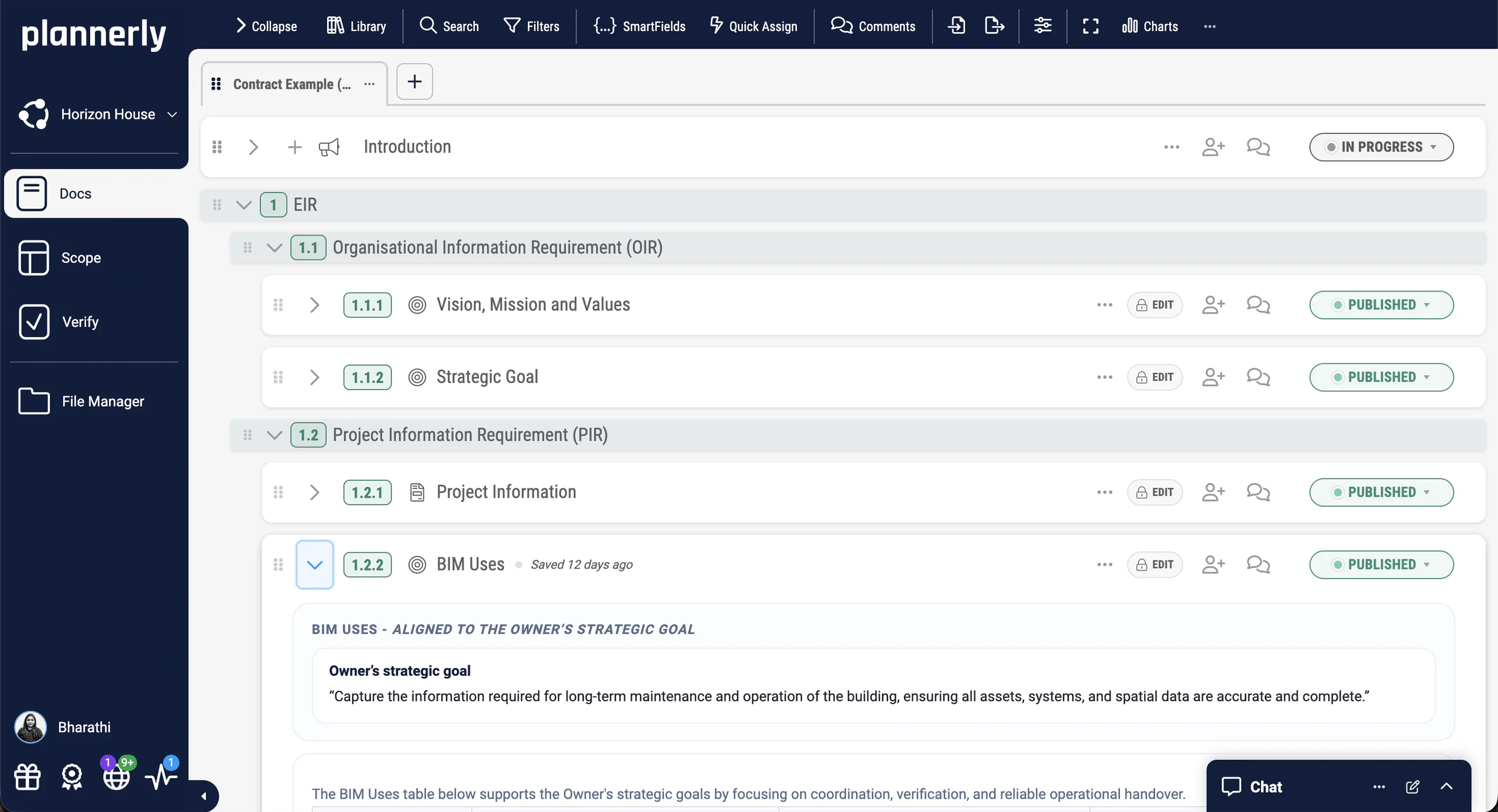
ISO 19650 asks for information requirements, a BEP, a MIDP built from every team's TIDP, a responsibility matrix and an audit trail - usually a Word file and five spreadsheets that never agree. Plannerly starts you from ISO 19650 templates, rolls every team's TIDP up into the MIDP automatically, and logs every decision, comment and approval as it happens.
Start from a first draft, not a blank page (AI can write it)
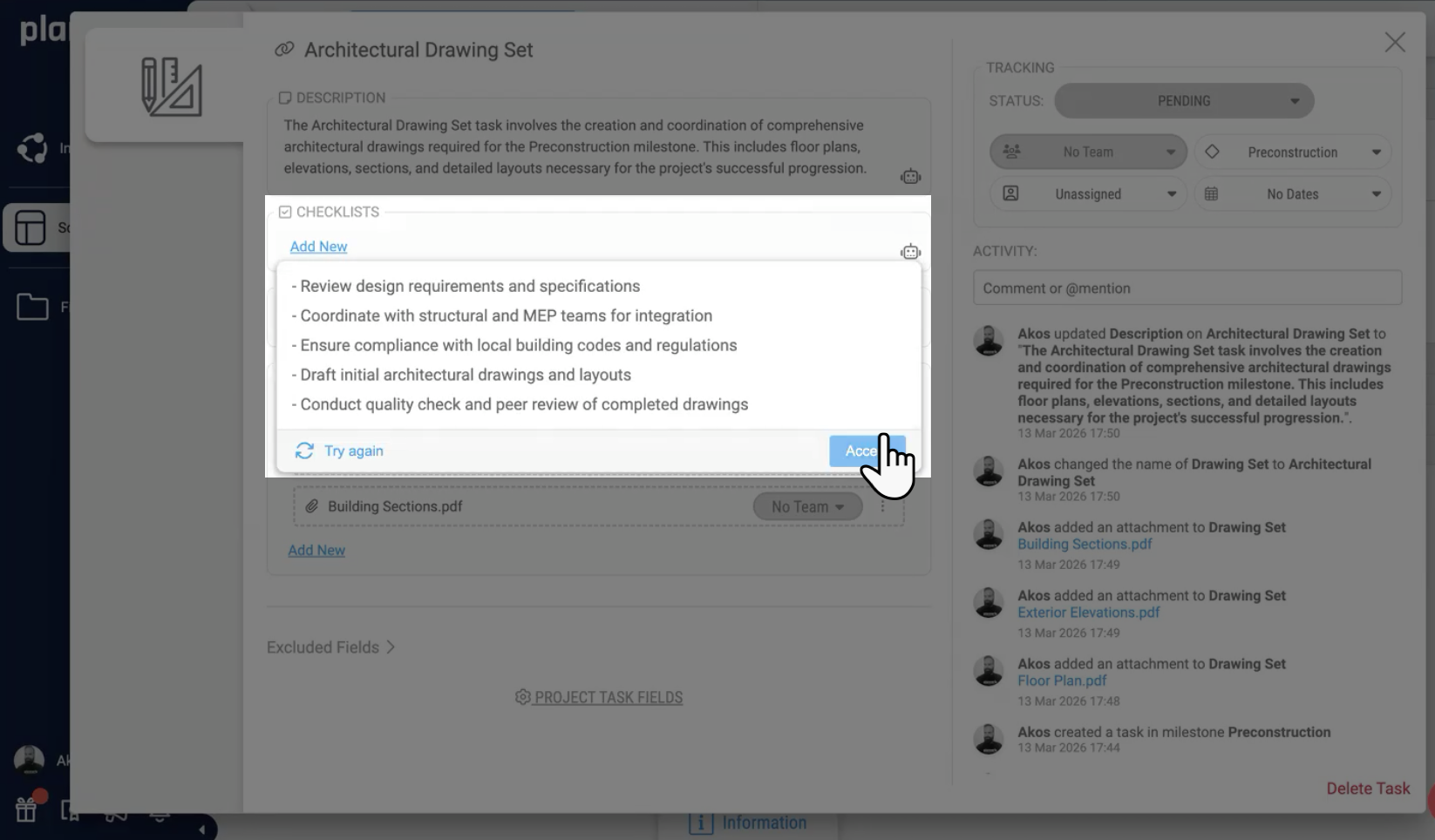
Nobody became an information manager to write this year's fifth BEP from scratch. Start from a template or your own file, and when you want help, Start with AI drafts an outline or a first version, Write my section answers a requirement you paste in and marks the project facts you need to confirm, and Expand and Correct tidy what's there. In Scope, AI can draft a task's description and acceptance criteria. You stay the author.
Start with AI, Write my section, Expand and Correct
Task descriptions and acceptance criteria drafted for you
A plan with owners, dates and reminders that teams actually follow
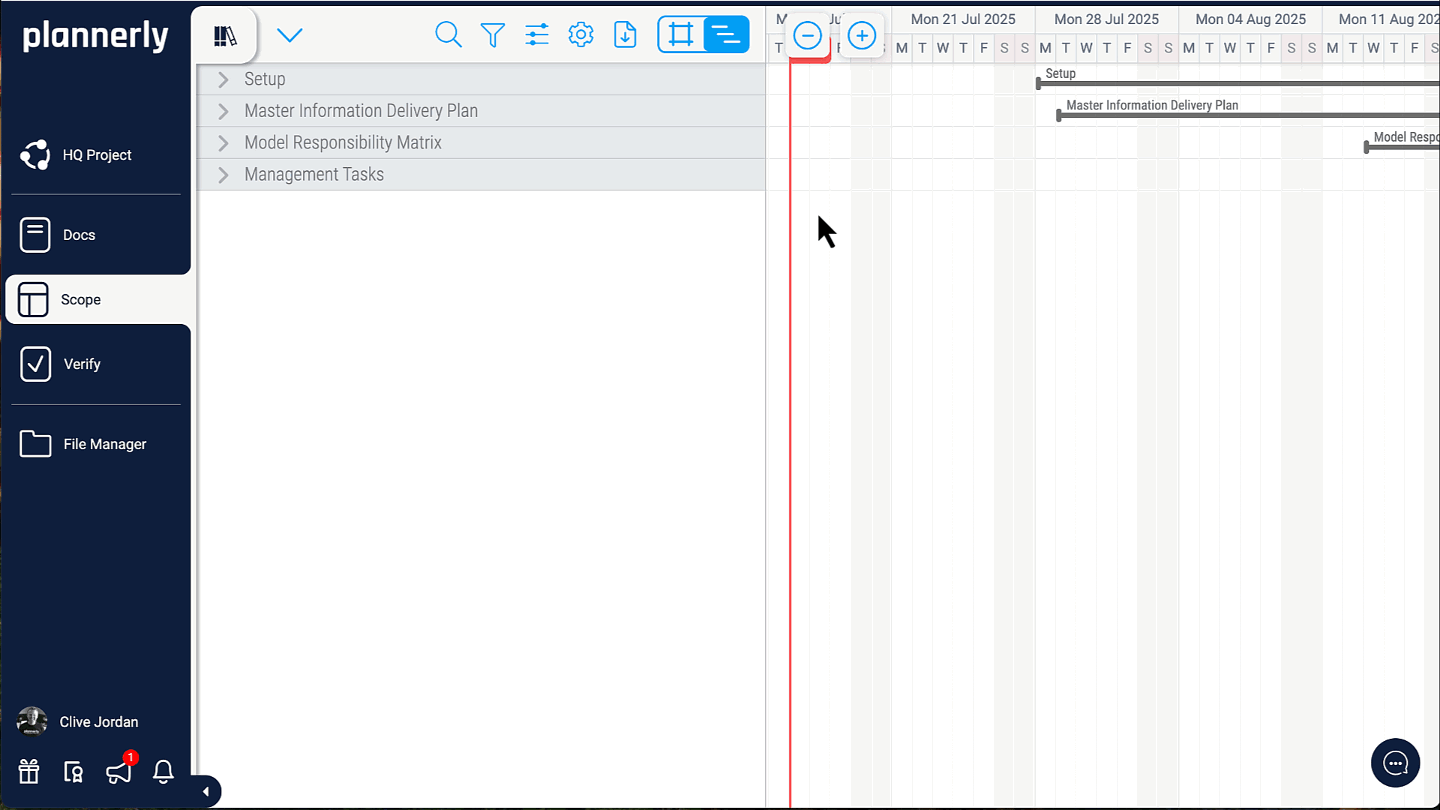
The programme lives in one tool, the deliverables in a spreadsheet, and you end up as the reminder system. In Plannerly the plan is the schedule: every task has an owner, start and end dates and its dependencies on the timeline. Reminders go out 7 days before a start, 3 days before a deadline and when a task is overdue, and the Kanban board and charts show where everything stands.
Grid, timeline and Kanban views of the same plan
Reminders before starts and deadlines, and when overdue
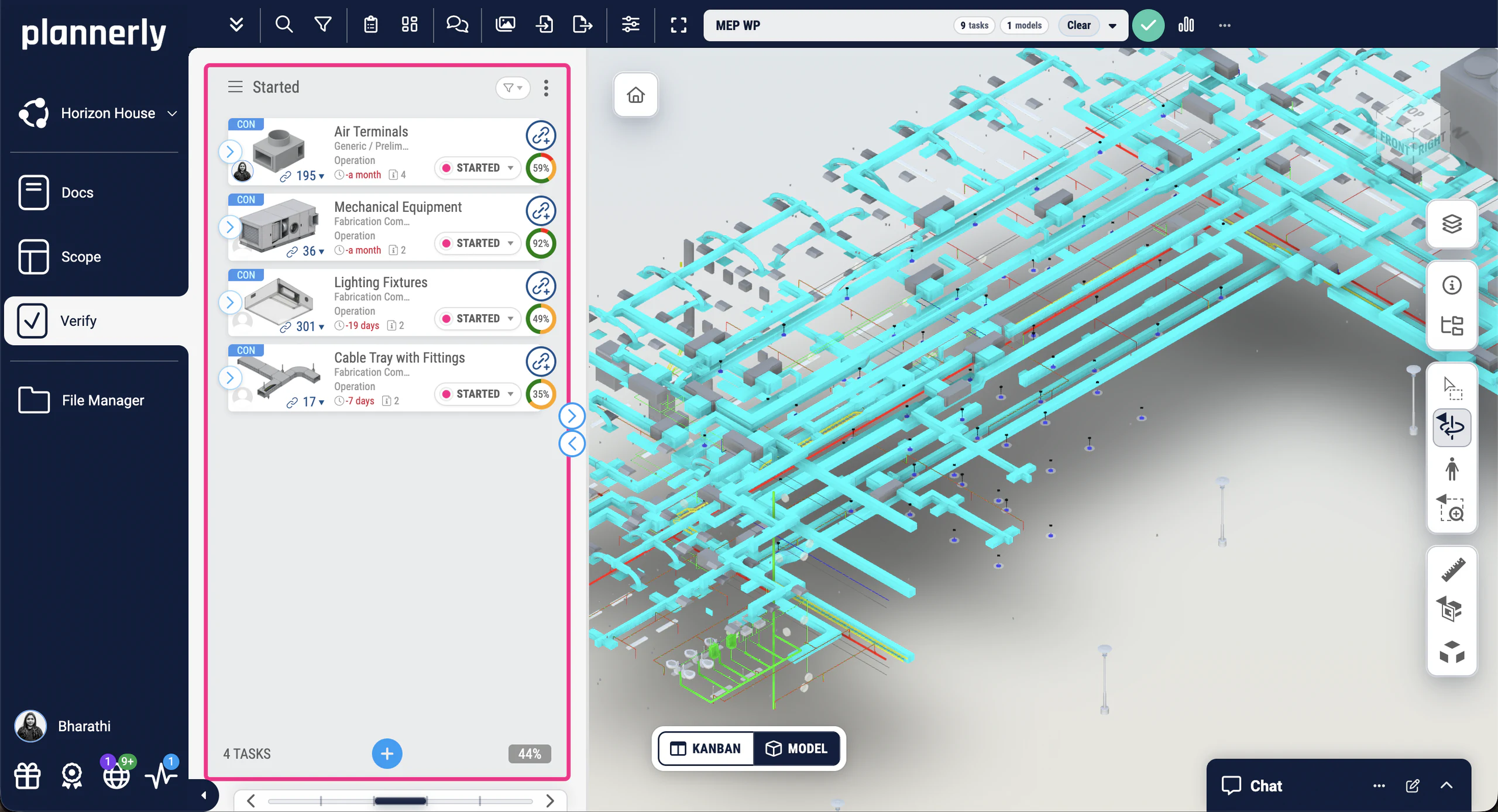
Checking models by hand means opening each one, clicking through the elements and ticking a spreadsheet nobody trusts. Verify checks every linked element against your own requirements automatically - the property, its value and unit, and its property set - in over 60 model file formats, and shows which team owns each fix. The charts update automatically as they fix it.
Over 60 model file formats, IFC and Revit among them
A handover you can check, and files that move to and from your CDE
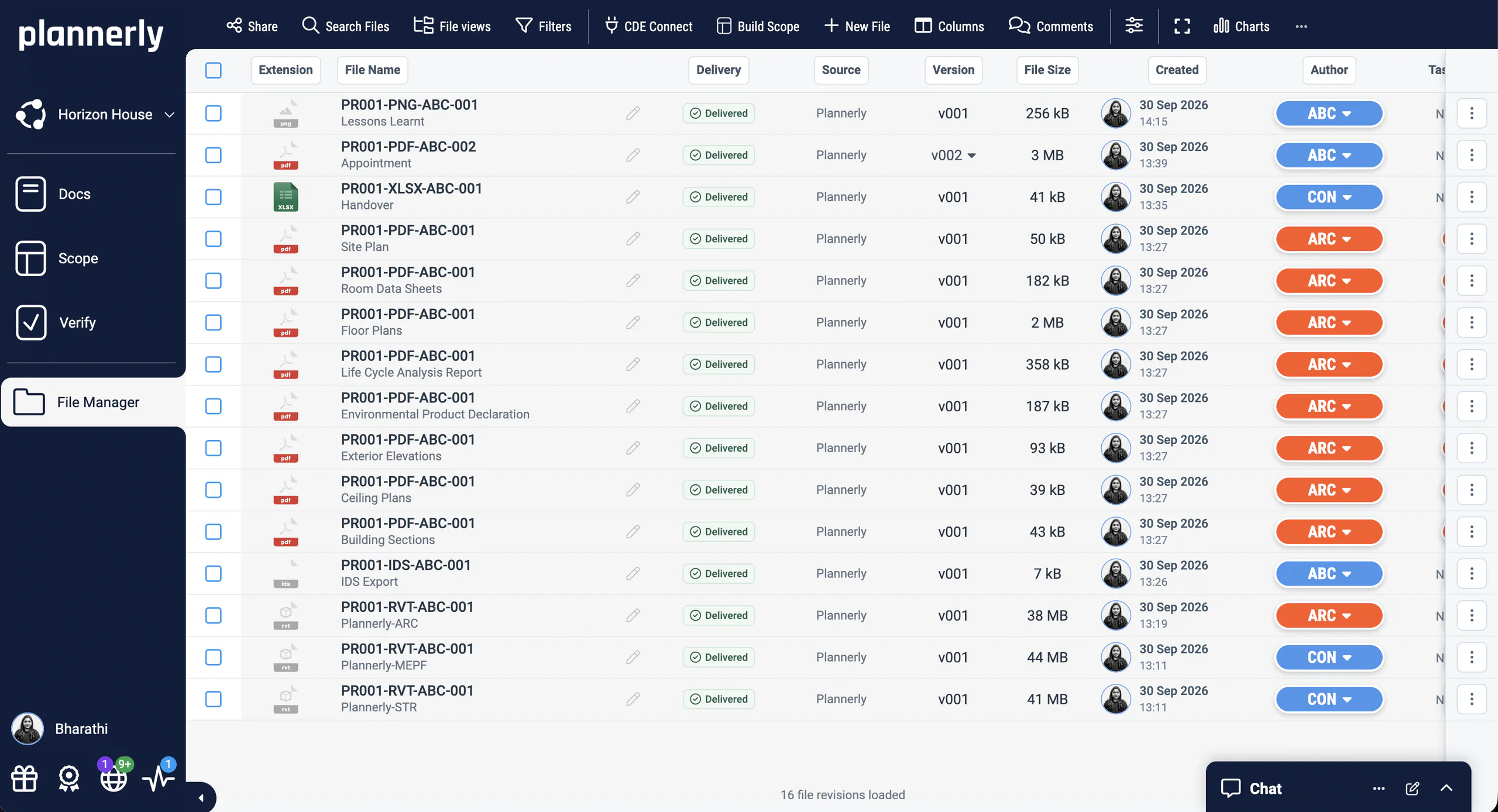
One project, several CDEs, and you downloading from one to upload to another. File Manager holds every delivered file with its source, version, size, date and author, and CDE Connect syncs the folders you choose in Autodesk, Procore, SharePoint and more, so the files you hand over are the ones the team actually shared.
Folders synced from Autodesk, Procore, SharePoint and more
Start your first plan from ours: the MIDP starter project and three ISO 19650 PDFs
Free download
MIDP Survival Kit: a starter project, the slides and two ISO 19650 PDFs
Start your MIDP from the project Episode 1 built instead of a blank spreadsheet, with all its slides and two PDFs from our free ISO 19650 training: the MIDP step and the whole process on one page.
1 starter project
3 PDFs
Free
PDF
PDF
PLANNERLY
MIDP starter project
Episode 1's MIDP as a project of your own: task teams, milestones and deliverables in Scope, ready for you to paste in your own lists.
Dr. Zulfikar Adamu integrated Plannerly certification into MSc coursework, achieving 100% student completion in 1-2 days. The module grew from an elective to a mandatory core across two programmes with 70+ students per cohort.
If every university that teaches construction introduces Plannerly, in three to four years you have an army of graduates who know how to implement ISO 19650 properly.
DZDr. Zulfikar Adamu, Associate Professor · LSBU
Education
ISO 19650
Certification
Read the story
See all case studiesOwners, design teams, contractors, consultants and educators - filter them by your kind of organisation.
What teams say
Owners, contractors, design teams, consultants and educators, in their own words
What changes when the plan has an owner on every line and the evidence keeps itself.
Owners on agreement, buy-in and requirements they can trace.
Contractors on planning the work together, and winning more of it.
Design teams on working across offices and countries from one plan.
Consultants on standards their clients actually use.
Educators on teaching ISO 19650 with a real project.
5 out of 5
Plannerly makes our conversations easier, it makes buy-in easier. It's a great basis of conversation and agreement.
JTJeff ThompsonAssistant Director · Broward County
5 out of 5
Plannerly is both a tool and a process. It gives my teams an advantage over the competition.
CEChris EveristBIM Manager · BNBuilders
5 out of 5
Everyone was able to work from different countries in a collaborative way online.
Plannerly accelerated our standards creation and virtually eliminated the burden to get updates to end users.
JRJohn RussoPresident · USIBD
5 out of 5
Students love Plannerly and it makes my life so much easier!
PKPetro KaranxhaProfessor · George Brown College
5 out of 5
It gives structure. It restructures everything. Everyone knows what they have to do.
AÁAndrás Ábele-NagyHead of BIM · BuildEXT
5 out of 5
Our design teams, PMs, and Clients love the clarity that Plannerly brings!
MFMatthew FullerBIM Program Lead · Texas Instruments
5 out of 5
Verify's integration with Autodesk Construction Cloud helps make BIM management more seamless for customers.
JCJames CookHead of Integrations · Autodesk
5 out of 5
Plannerly is easy to put together, organize, view, and customize - and inviting team members is simple. It's changed how we manage project information.
DRDarren RCorporate VDC Director · Bernard's Contractors
Security and trust
Enterprise-level security, and control over who sees what
Plannerly is a BIM and information management platform built around ISO 19650. Teams write their project documents in Docs, plan who delivers what and when in Scope, check models against their requirements in Verify and manage the files in File Manager, and AI can draft the paperwork when they want it to. Owners, contractors, design teams and consultants use it to agree who does what and keep the evidence. See the jobs it does, or take the free training.
Is Plannerly ISO 19650 compliant?
Software can't be compliant on its own - your organisation and your projects are. Plannerly is built around the ISO 19650 workflow, from information requirements to the BEP, MIDP, responsibility matrix, model checking and handover, so you have the structure and the evidence an audit asks for. The free ISO 19650 for Companies course covers the rest, and ISO 19650-2 is the standard itself.
Is Plannerly a CDE?
It can be. Plannerly stores files and connects them to the documents, scope, tasks and approvals that produce them, which is what a common data environment is for. Many teams also keep Autodesk Construction Cloud or BIM 360 and connect it, so delivered files reach the plan by themselves. Using Plannerly as a CDE and Plannerly and Autodesk CDEs, side by side.
Does Plannerly use AI?
Yes, when you want it - to save you writing, never to replace your judgement, and every job works without it. In Docs, AI can draft an outline or a first version, answer a requirement section by section and tidy your wording; in Scope, it can draft task descriptions and acceptance criteria and draw each level of geometry. You check and agree what it writes. How AI works in Plannerly, Turn the EIR into a BEP with AI and AI in construction management.
Who uses Plannerly?
Information managers, BIM managers and coordinators at owners, contractors, architects and engineers, consultancies and universities - nearly 150,000 teams in over 100 countries. Government agencies use it to check models against their requirements, and universities to teach ISO 19650. Read their case studies.
How much does Plannerly cost?
You can start free: the Free plan covers your first five projects. Pro adds the paid features in the modules you choose, priced per project, with editors and viewers unlimited, and you can try it free for 14 days - model checking included. Company adds custom roles, single sign-on and your data in the region you choose. See the prices.
Do the people I invite have to pay?
No. Everyone you invite joins free. On the Free plan they can view your project; on Pro and Company, editors and viewers are unlimited, so every task team can work on its own lines at no cost to them. Invite your team.
How do I log in to Plannerly?
Go to app.plannerly.com and sign in with your email and password, or with Google, Microsoft, Autodesk, Procore or LinkedIn - whichever you signed up with. The free training has a separate login of its own. Login options and trouble logging in.
Which languages does Plannerly support?
The interface comes in more than 30 languages, Arabic and Persian among them, and each project has its own language for its documents, templates and libraries, so a team can work in their own language while the contract stays in the project's. Language support and how to change it.
Does Plannerly work with Autodesk Construction Cloud and Revit?
Yes. Connect your ACC or BIM 360 hub to bring models and files into Plannerly, and Verify checks Revit and IFC models among over 60 formats. A Revit plug-in can also push your Plannerly requirements into Revit families. Link your ACC or BIM 360 account and Revit integration.
Is my data secure?
Roles and permissions control who can see and edit each document, task and file, every change is logged, and on the Company plan your data stays in the region you choose - the US, the EU or Canada. Security and data safety and roles and permissions.