Coordinating the plan and the people
Agree who models what, to which level, by when; assign the tasks; keep every team's deliverables on schedule; and see progress without chasing anyone.

BIM coordination software
BIM coordination is more than finding clashes. Agree who models what, to which level, by when; track every team; check every model's information against what was asked for; and keep every file where the plan expects it. Plannerly coordinates all of it in one place.
Free plan, no card. Everyone you invite joins free.
What Plannerly coordinates
Who models what, to which level, by when - every element and milestone on one grid, each cell assigned to a team and a person.
ScopeTasks move across the Kanban board and the charts of documents, tasks and model checks update by themselves, with a weekly PDF report.
TrackOne accountable team on every deliverable, a work package for each team, and comments and history on the work itself.
RACIEvery model version checked against your own requirements automatically, in over 60 file formats or straight from Autodesk Construction Cloud.
VerifySet the level of detail and the information each element needs at each milestone, then Verify checks every delivered model's information against those requirements.
ScopeVerifyEach element's properties checked against the information requirements, and shared as an IDS file so authors check before they send.
IDSEach property checked against its rule - a number between two values, one of a list, true or false, or not empty - with its unit and property set.
VerifyLook into any model in Verify: walk through it, measure it and section it, even before its elements are processed for checking.
VerifyFiles from Autodesk, Procore, SharePoint and more fill the plan's named requests by themselves, and a duplicate is flagged for someone to confirm.
File ManagerBIM coordination means getting every team, every model and every file to fit together. It's much more than finding clashes:
Agree who models what, to which level, by when; assign the tasks; keep every team's deliverables on schedule; and see progress without chasing anyone.
Check that each model carries what was asked for - the level of information need, the properties and their values - and look into the model itself when something doesn't add up.
Make sure the files each team delivers are the ones the plan asked for, wherever they were shared.
Federate the models and find clashes. Tools such as Navisworks, Revizto and BIMcollab do this today; Plannerly is adding clash detection and coordination.
| The job | Usually done in | In Plannerly |
|---|---|---|
| Planning, scoping and assigning tasks | An LOD spreadsheet and a task list | One scope grid: every element and milestone, with its level of information need and one owner |
| Schedule and tracking | A separate programme and email reminders | Every TIDP rolled up into the MIDP, on a timeline with dates, dependencies, reminders and a Kanban board |
| Dashboards | A tracker rebuilt in Excel every week | Charts of documents, tasks and model checks that update by themselves, and a weekly PDF that sends itself |
| Teams and people | A responsibility matrix in a BEP appendix | One accountable team on every deliverable, work packages for each team, and comments on the work itself |
| Model checking: LOD, information and rules | Opening each model and ticking a spreadsheet | Every element checked against its requirements - each property, its value, unit and property set - automatically |
| Looking into the models | A desktop viewer | Walk through, measure and section the model in Verify |
| Files | Downloading from one CDE to upload to another | Delivered files fill the plan's named requests, synced from your CDE, with duplicates flagged |
| Clashes between models | Navisworks, Revizto or BIMcollab | Coming soon - keep your clash tool for now |
New to the role? Read what a BIM coordinator does, see BIM schedule software, or compare the tools in the 10 best BIM software.
Coming soon
We're adding clash detection and coordination to Plannerly, to streamline the clash coordination workflow beside the scope, the checks and the people who own each fix. It isn't available yet.
Coming soonKeep Navisworks, Revizto or BIMcollab for clashes, and use Plannerly so the models reaching your clash meeting already carry what was asked for.
TodayHow it works in Plannerly
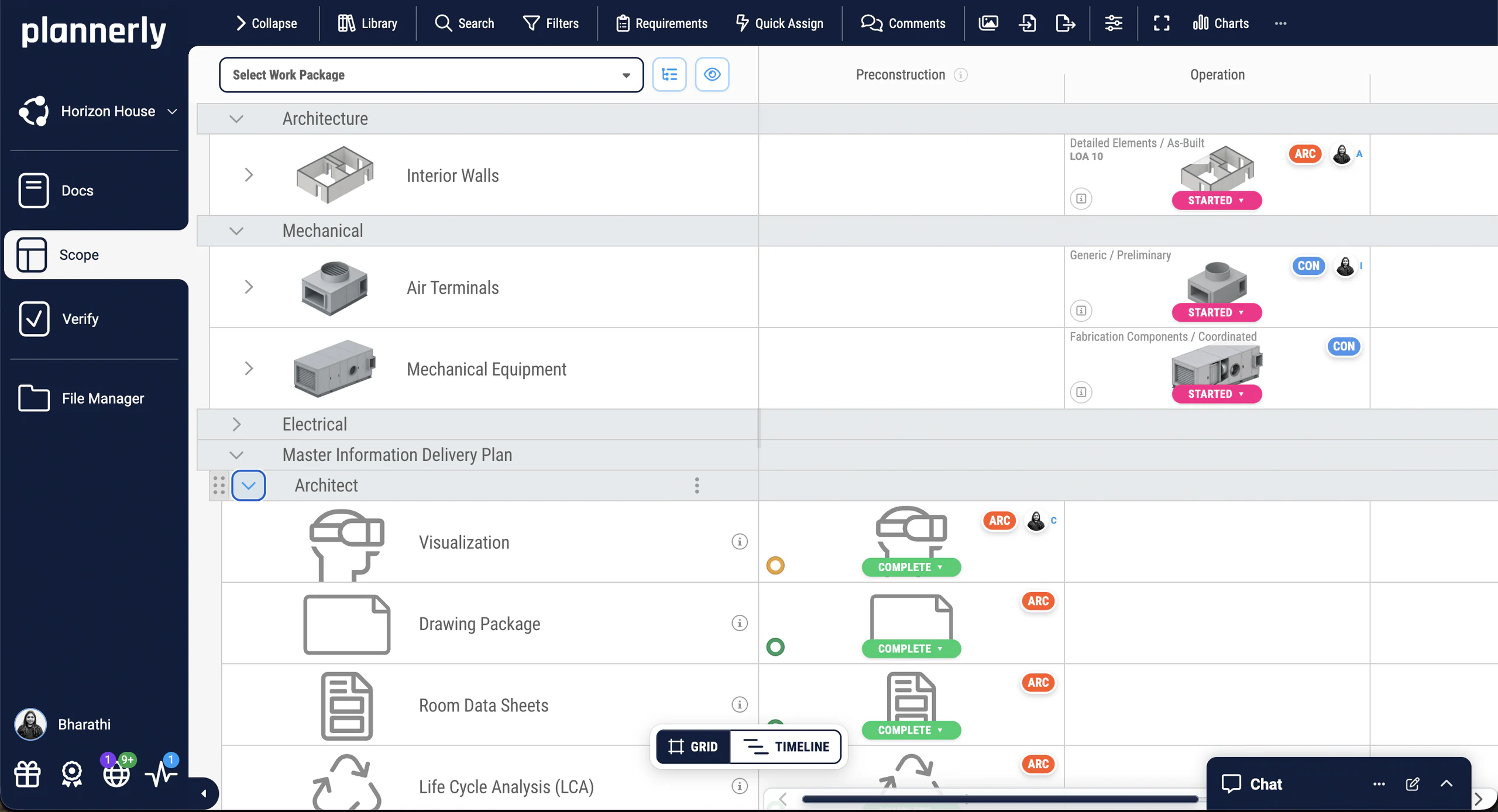
One grid: every element and deliverable down the side, milestones across, and in each cell the level of information need and one owner.
Who models what, to which levelEach deliverable has one accountable team and a responsible person, and the responsibility matrix is built from the plan, not typed into an appendix.
An owner on every lineEvery TIDP rolls up into the MIDP on a timeline with dates and dependencies. Reminders go out before starts and deadlines, and the charts follow.
A schedule teams followVerify checks each model against the requirements, and delivered files fill the plan's requests as they arrive from your CDE.
Evidence of what was deliveredWatch
In Plannerly
Scope
The LOD spreadsheet is out of date the day it's sent. In Plannerly Scope every element and deliverable sits on one grid with milestones across the top, and each cell holds the level of information need, the requirements and one owner.
See ScopeSchedule
The plan is the schedule: every task has an owner, start and end dates and its dependencies on the timeline. Reminders go out 7 days before a start, 3 days before a deadline and when a task is overdue.
See the schedule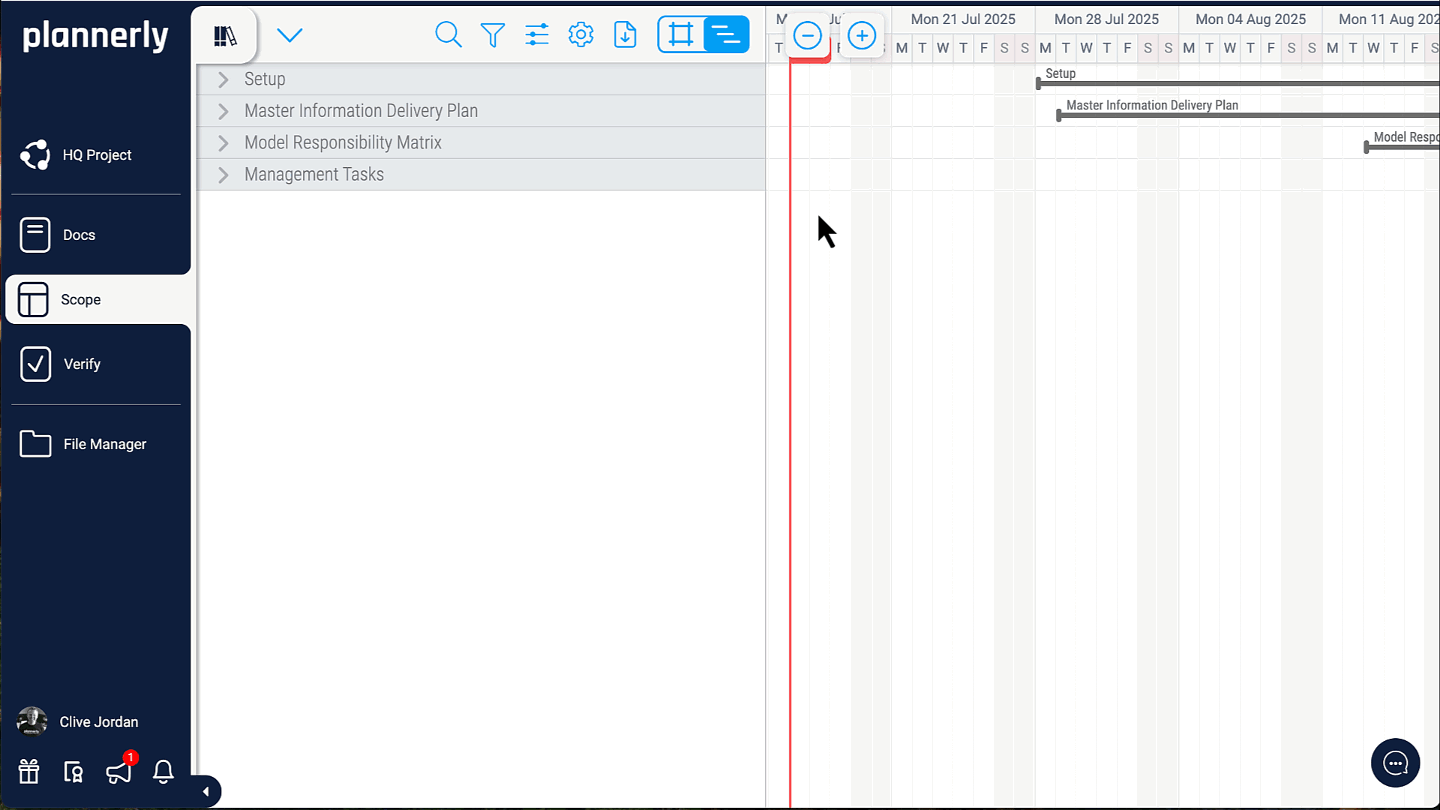
Dashboards
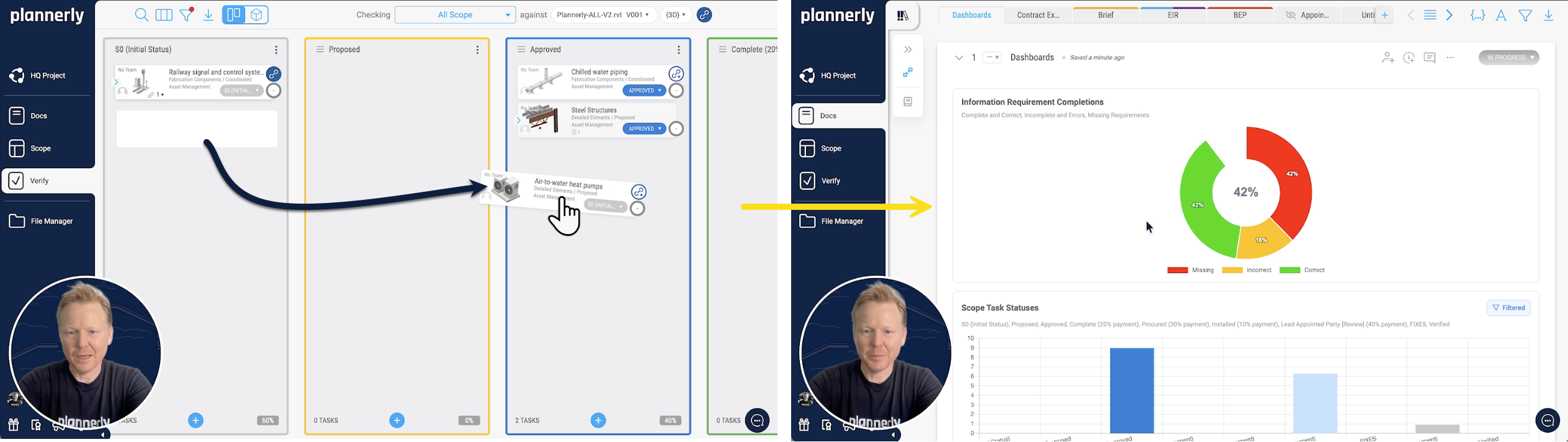
When a team moves its task across the Kanban board, the dashboard updates by itself. Nobody copies numbers into a spreadsheet, and everyone sees the same picture of who has done what.
Verify
The scope you agreed becomes the checks. Verify checks every linked element against your requirements automatically, in over 60 file formats, and shows which team owns each fix.
BIM model checking software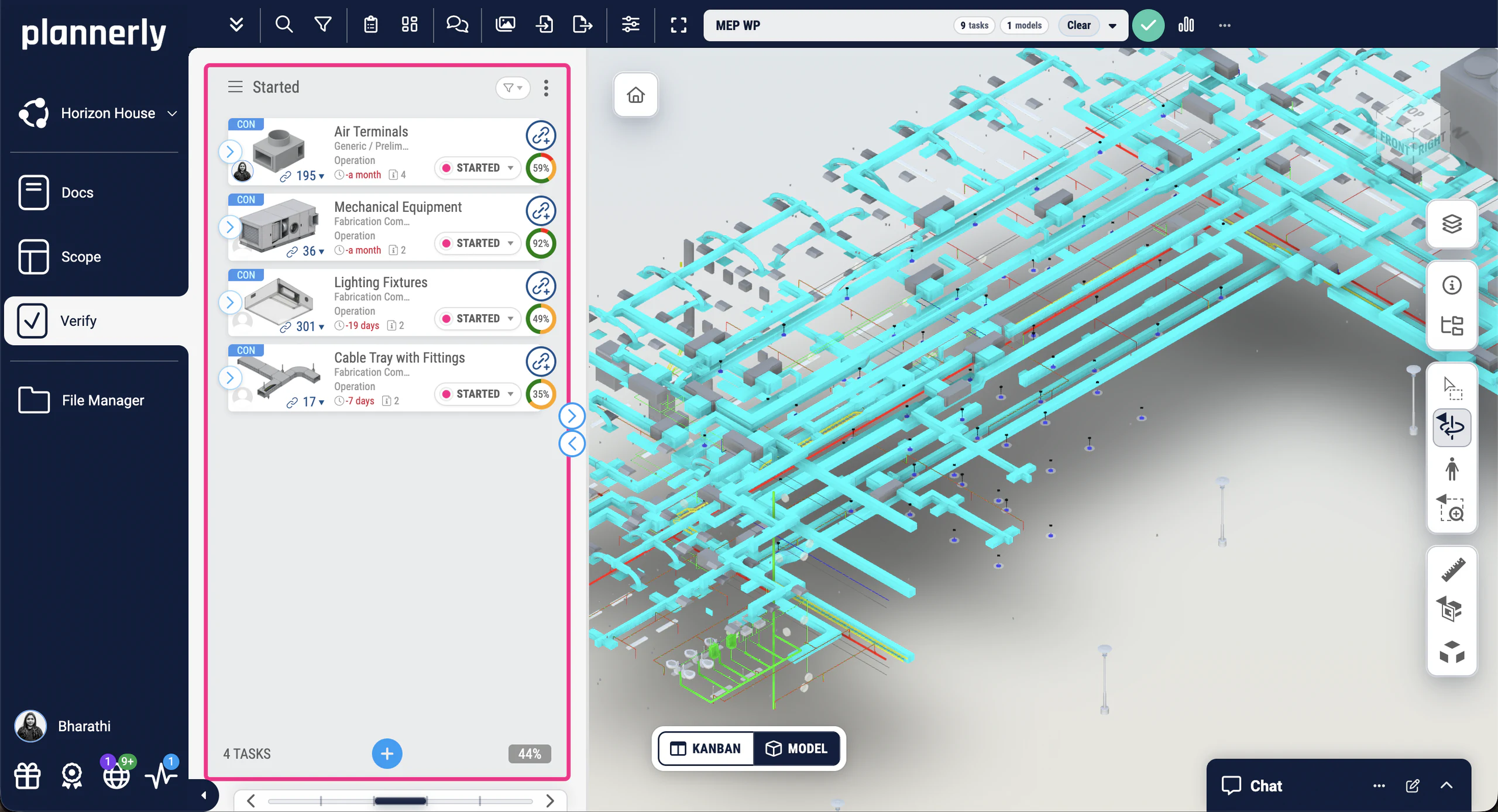
File Manager
File Manager holds every delivered file with its source, version, size, date and author, and CDE Connect syncs the folders you choose, so the files you hand over are the ones the teams delivered.
See how CDE Connect works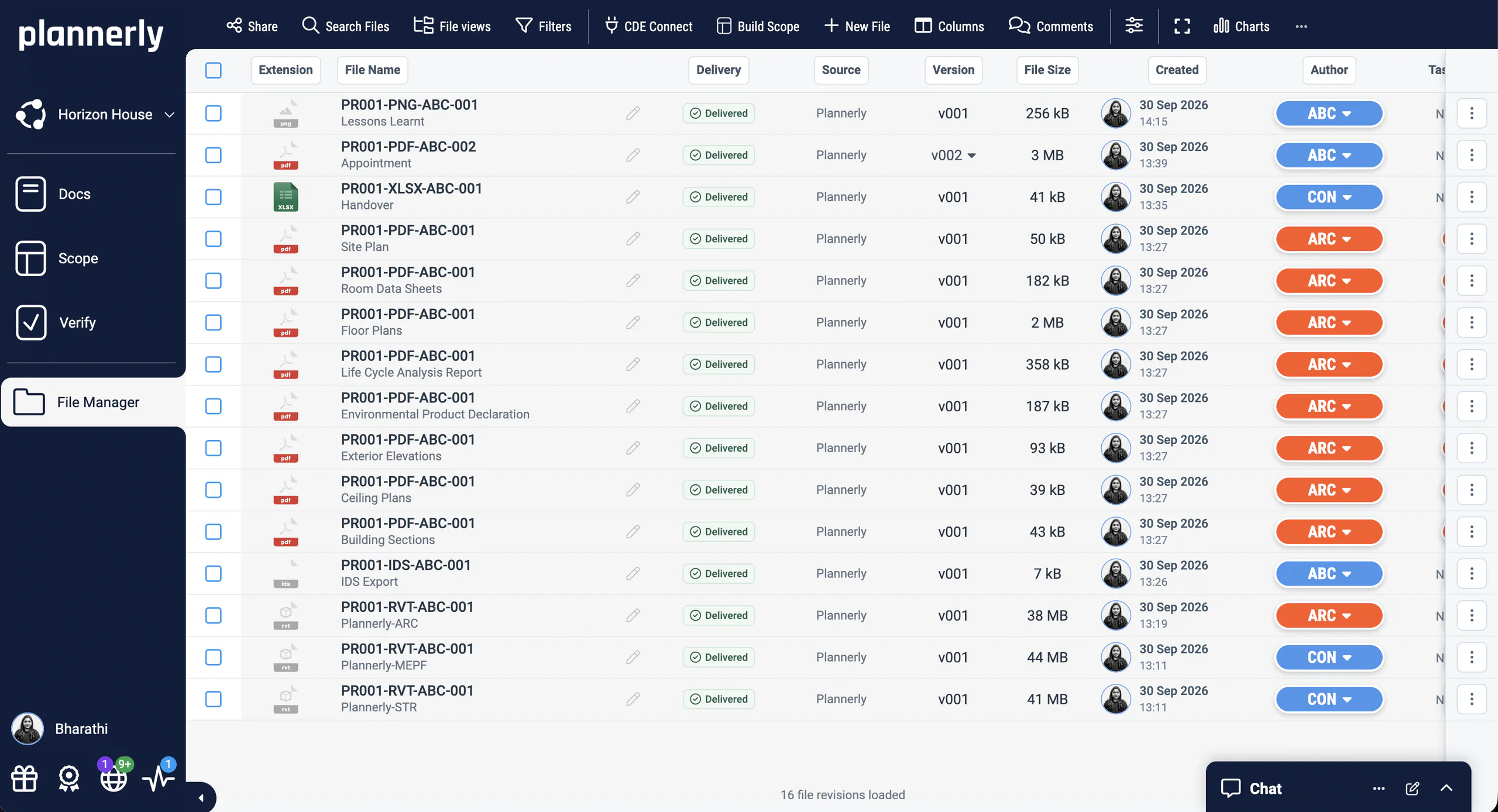
Case studies
 United States
53% fewer clashes
$130M residential project
Major Real Estate Developer · 800+ O&M team
A $130M apartment project achieved 16.5% time savings and 53% fewer clashes, with 98% of constructability issues solved vs 31% on the control project.
The Plannerly process prompted critical cross-company conversations months before they would have caused problems.
 United Kingdom

Global practice
World-leading architecture studio
Foster + Partners · Architecture
One of the world's most celebrated architecture studios uses Plannerly to manage structured BIM requirements across their global portfolio of landmark projects.
Trusted by one of the world's most iconic architecture practices to manage BIM requirements at a global scale.
United States

5x growth · 60% faster
VDC workflows streamlined
reiSource · VDC consultancy
Replaced 5 disconnected tools with one platform. Scope prep dropped from 8 hours to 2 and the team scaled from 3 to 15 without compromising quality.
What we used to do with five tools, we now do with one, and with more consistency.
See all case studiesOwners, design teams, contractors, consultants and educators - filter them by your kind of organisation.
What teams say
5 out of 5
Plannerly is both a tool and a process. It gives my teams an advantage over the competition.
5 out of 5
Plannerly makes our conversations easier, it makes buy-in easier. It's a great basis of conversation and agreement.
5 out of 5
It gives structure. It restructures everything. Everyone knows what they have to do.
5 out of 5
Everyone was able to work from different countries in a collaborative way online.
5 out of 5
Our design teams, PMs, and Clients love the clarity that Plannerly brings!
Free download
Start your MIDP from the project Episode 1 built instead of a blank spreadsheet, with all its slides and two PDFs from our free ISO 19650 training: the MIDP step and the whole process on one page.
Episode 1's MIDP as a project of your own: task teams, milestones and deliverables in Scope, ready for you to paste in your own lists.
Questions
Agree who models what, track it, and check the models and files that come back, in one place. Start free, or book a meeting and we'll show you on a real project.
Free plan · No card · Everyone you invite joins free