Information checks (validation)
Does each element carry the properties the project asked for, with the right values and units, in the right property set? This is BIM validation.

BIM model checking software
BIM model checking software tests every model against the project's requirements, so nobody has to open each one and tick a spreadsheet. Here's what validation, clash detection and QA tools each do, three ways to check models, and how Plannerly checks every version for you, unattended.
Free plan, no card. The 14-day Pro trial includes model checking.
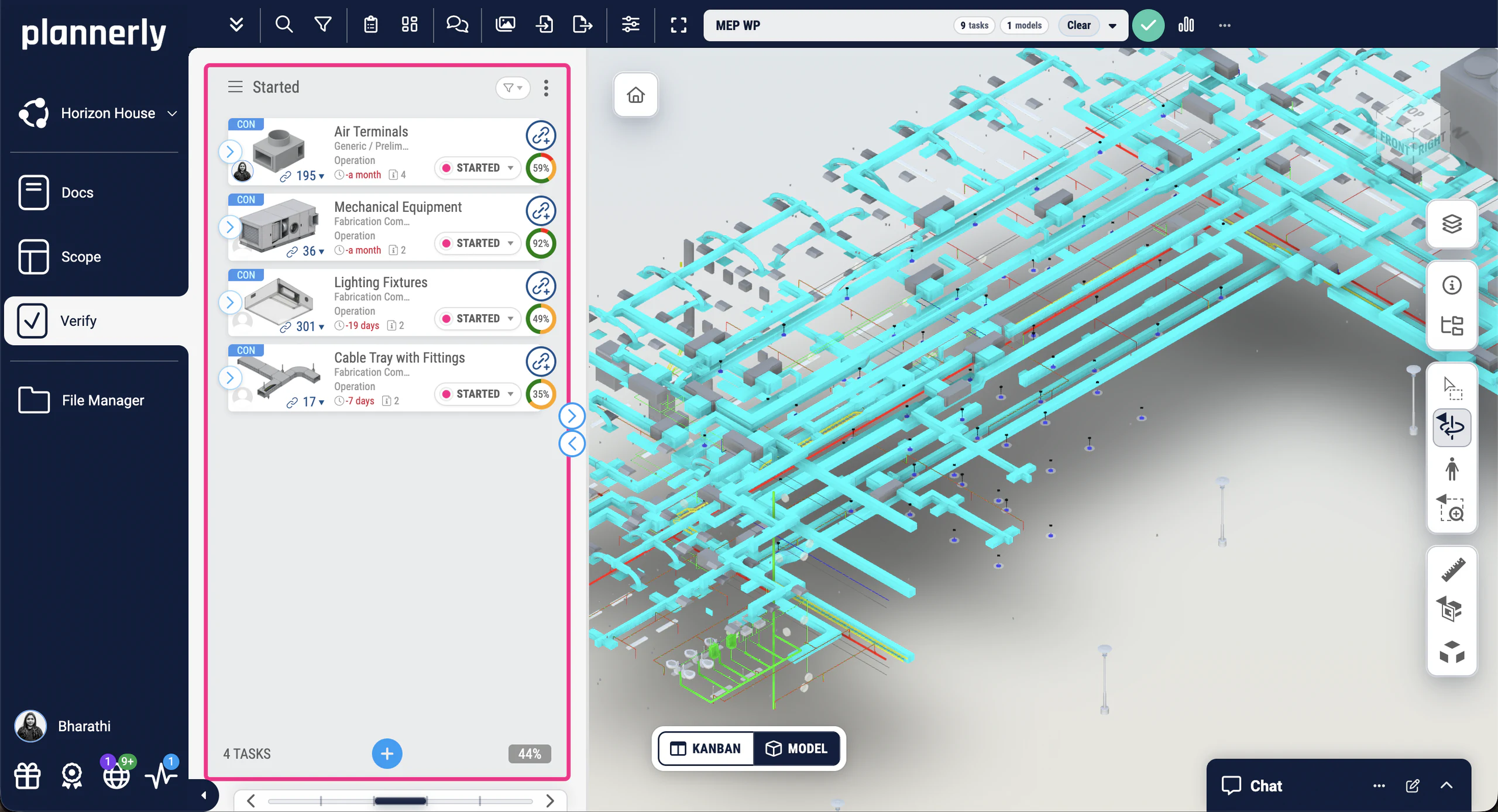
BIM model checking software tests a model against what the project asked for, so nobody has to open every model and tick a spreadsheet. "Checking the model" covers different jobs, and most projects need more than one tool:
Does each element carry the properties the project asked for, with the right values and units, in the right property set? This is BIM validation.
Do elements clash, keep their clearances and sit where they should? Coordination tools such as Navisworks, Revizto and BIMcollab do this.
Does the design meet rules such as escape distances or accessibility? Rule-based checkers such as Solibri check these.
Is there a routine - who checks what, when, and how fixes are tracked - so quality doesn't depend on someone remembering? That's BIM quality assurance; each check is quality control.
A typical model has thousands of elements, each with a handful of required properties, and a new version arrives every week or two. By hand, someone samples a few elements, finds what they find and writes it up. The rest goes unchecked until handover, when it's expensive to fix.
Most teams use one or more of these. They work best when they all check against the same requirements:
| Approach | What it checks | Who runs it, and when | Good for |
|---|---|---|---|
| Desktop rule-based checker (such as Solibri) | Information, geometry and design rules in IFC models, against rule sets | A specialist, on a downloaded copy, at set points | Detailed reviews and code checks |
| IDS check in the authoring or checking tool | Information, against a buildingSMART IDS file | Each author, on their own model, before they share it | Catching gaps before a model leaves the team |
| Automatic checking on a platform (Plannerly Verify) | Information, against the project's requirements, element by element | Nobody has to press a button: every new version is checked as it arrives | Unattended checking, tracking fixes and showing evidence to the client |
They fit together: write the requirements once in Plannerly, export them as an IDS file for the authors, and Verify checks the delivered model against the same rules.
Unattended model checking means the checks run on every new model version without anyone starting them. In Plannerly, connect Autodesk Construction Cloud or BIM 360 and new versions come across by themselves; once the model's elements are linked to their tasks, every check runs automatically, the charts update and a PDF report can go out every week.
See it step by step in unattended BIM model checking: an automated workflow.
For the quality side - requirements, a BEP and a checking routine - read BIM quality assurance and control software: 3 simple ideas. To coordinate who models what and by when, as well as checking it, see BIM coordination and project management software.
How it works in Plannerly
Write each property the project needs - name, rule, value, unit and property set - against the elements and milestones it applies to.
One set of rules for people and softwareUpload IFC, Revit or any of over 60 formats, or connect Autodesk Construction Cloud and BIM 360 so new versions come across by themselves.
Every version in one placeEach linked element is checked automatically: the property is there, its value and unit meet the rule, and it sits in the right property set.
Correct, incorrect or missingEach team sees its failed checks as tasks on the Kanban board, the charts update as they fix them, and a PDF report can go out every week.
Evidence of who fixed whatWatch the overview
In Plannerly Verify
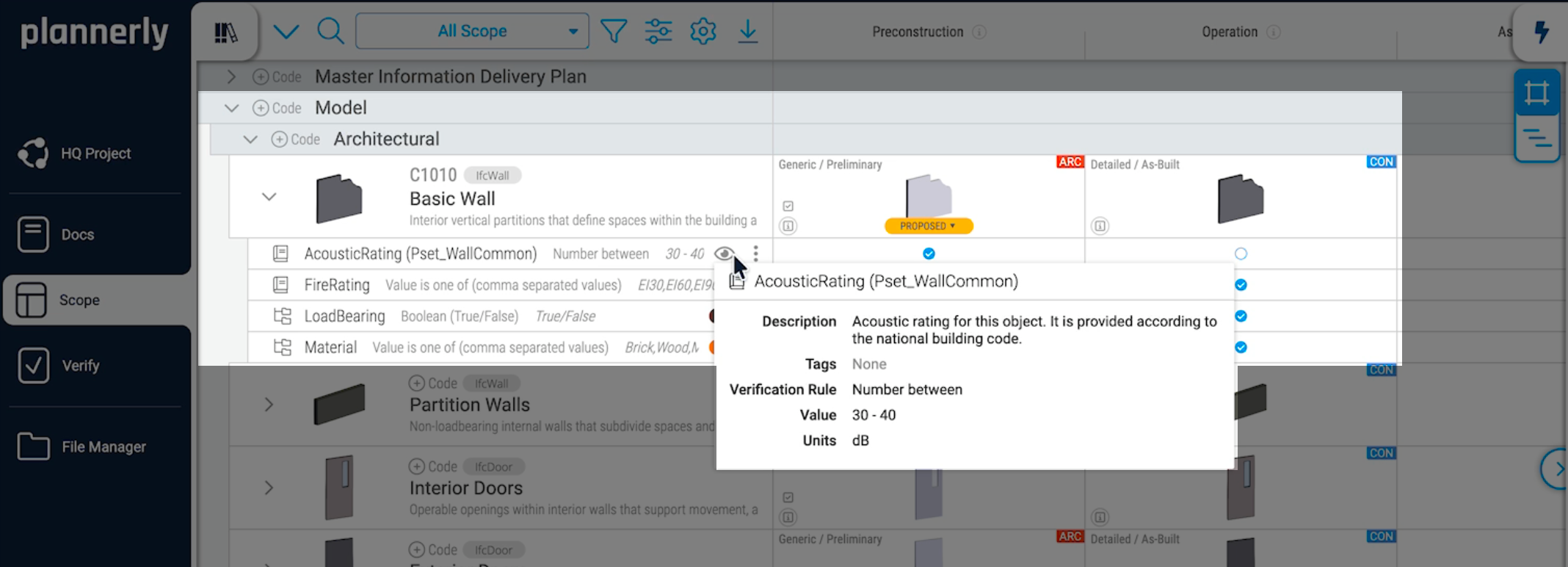
Requirements as data
Requirements in a PDF get skimmed once and forgotten. In Plannerly they live as data, per element and milestone, and you can export them as a buildingSMART IDS file, so authors check their own models with the same rules Verify uses on the delivered model.
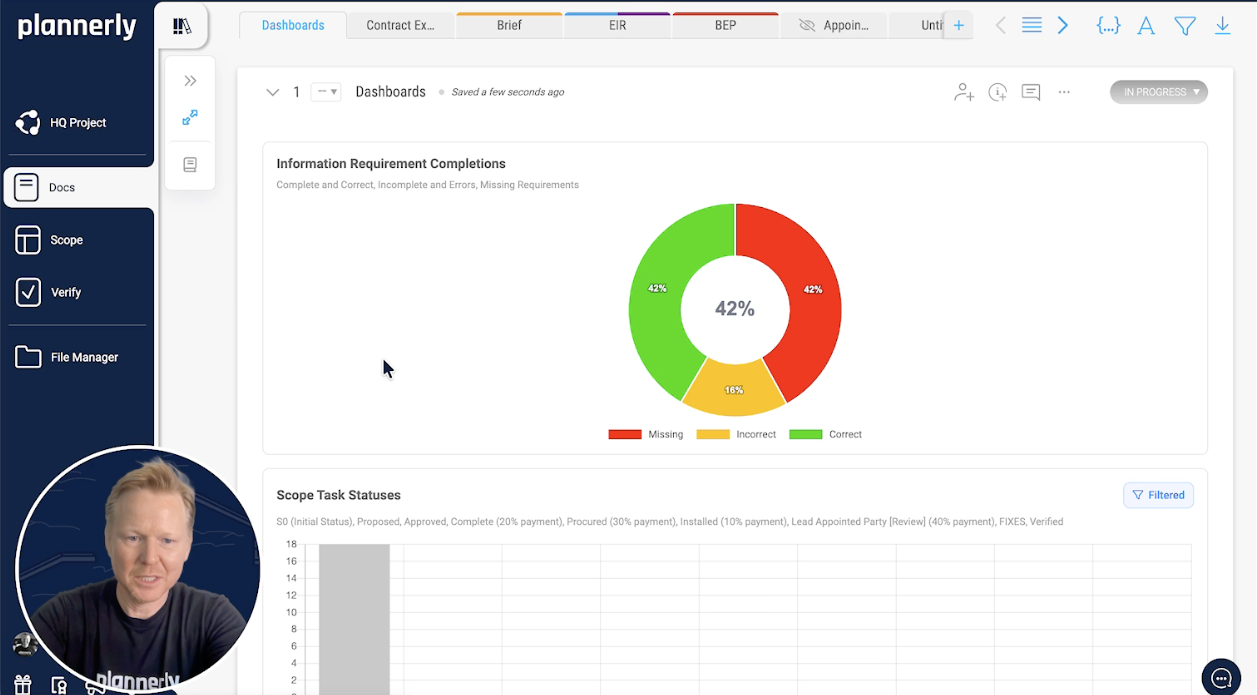
Quality you can see
Add a chart to any document and it counts every requirement check on the linked model elements as correct, incorrect or missing. Filter it by milestone, team or work package, so each team sees the part it's accountable for.
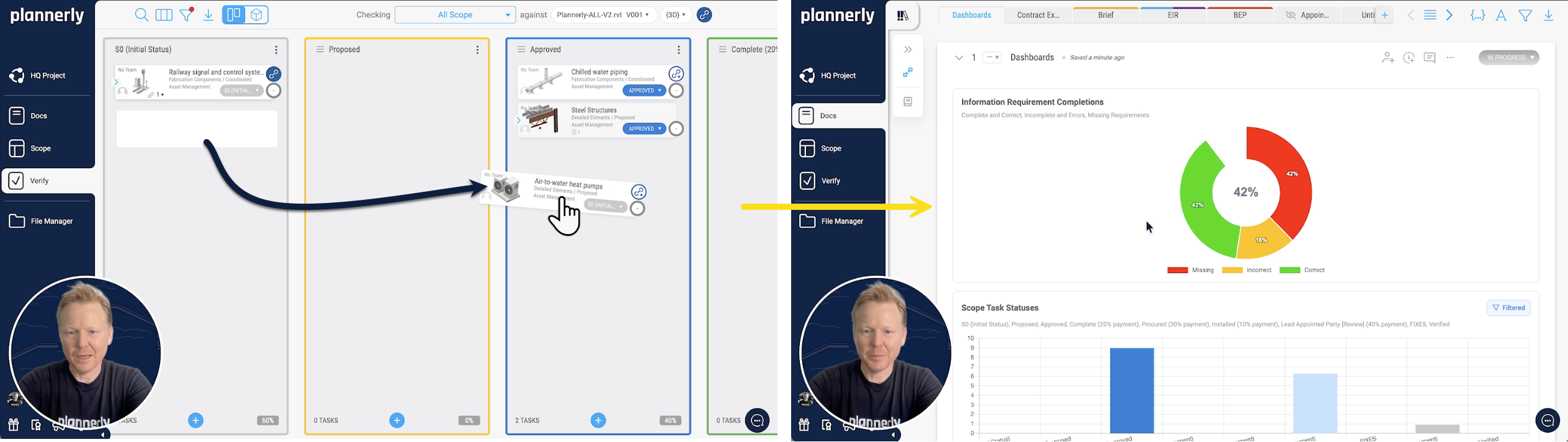
Unattended
When a team fixes what failed and moves its task across the Kanban board, the dashboard updates by itself. Nobody refreshes it or copies numbers into a spreadsheet, and the weekly report sends itself.
Your CDE
Connect Autodesk Construction Cloud or BIM 360 once and link the models you need. New versions come across by themselves, and the permissions you already have in ACC still apply.
See how CDE Connect works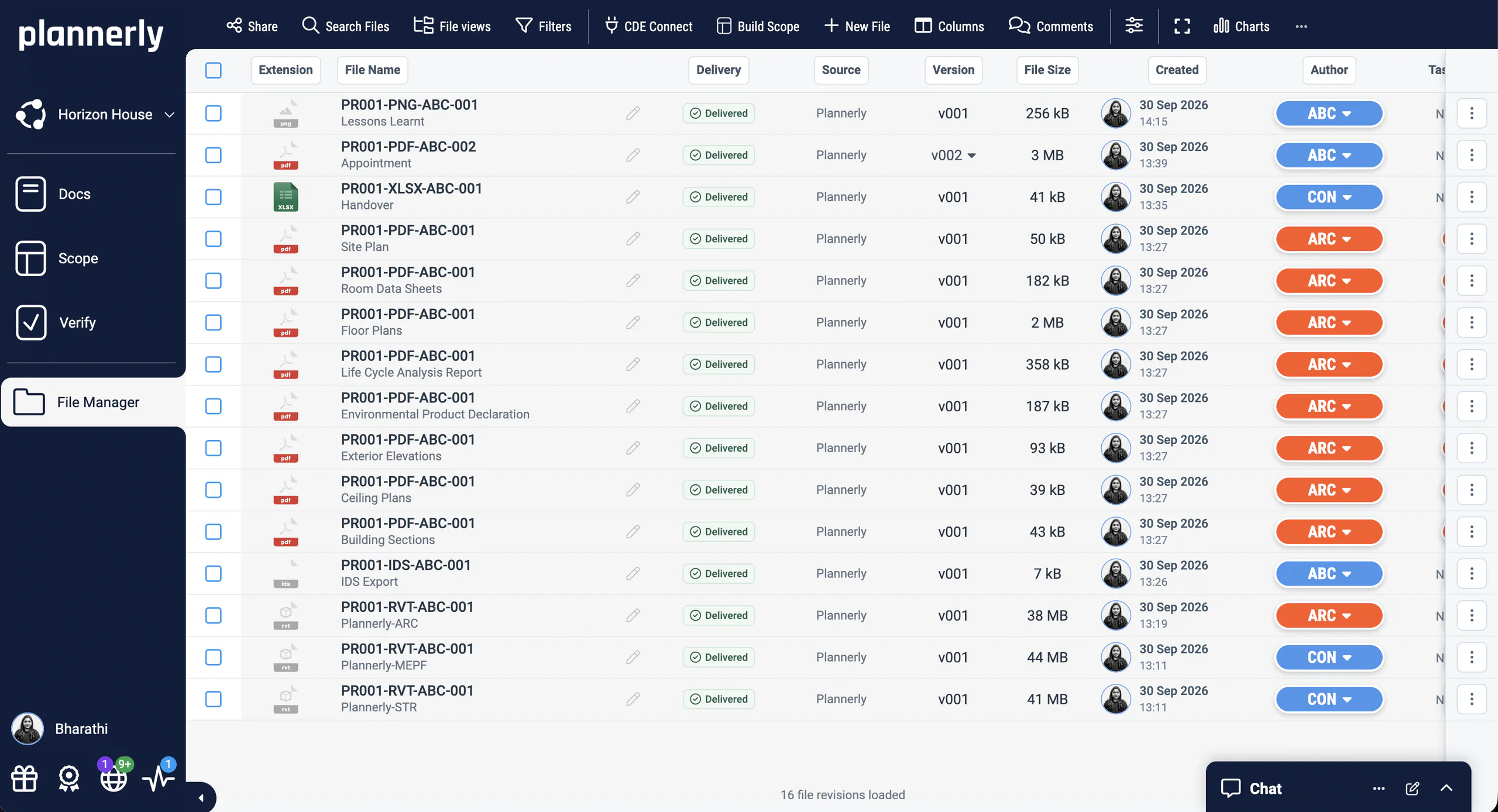
Case studies
A government agency that replaced 11,000 Excel rows with automated checks, a transport department checking its supply chain's models, and a consultancy bringing Plannerly and Solibri together.
 Singapore

95% faster
Model validation time
JTC Corporation · Government agency
Eliminated 11,000 Excel rows and automated compliance checks across 2,000+ object types and 27 model categories with Plannerly's Verify module.
Before Plannerly, it took weeks to do model checks. Now we do it in hours.
 Australia
Government QA
Model data checked against information requirements
Queensland Department of Transport and Main Roads · Government owner
Queensland's Department of Transport and Main Roads uses Plannerly Verify to check supply-chain model data against defined information requirements, giving the team more certainty that model deliverables contain the information they expect.
It highlights the need for due diligence when pulling all of the pieces of the puzzle together.

3 countries · Plannerly + Solibri
Singapore, Malaysia & Indonesia
AdRem IT Solutions · BIM services
Integrated Plannerly with Solibri's Accessibility Code Checker for automated CORENET X compliance in Singapore, and now rolling out ISO 19650 certification across Malaysia and Indonesia.
Plannerly is critical to our information compliance standards and now with the tracking reports built in, we can spend more time ensuring better quality deliverables and less time collecting compliance statistics with screenshots.
See all case studiesOwners, design teams, contractors, consultants and educators - filter them by your kind of organisation.
What teams say
5 out of 5
Compliance checks used to be a black box. Now, every requirement is traceable and auditable.
5 out of 5
Plannerly cut the time we spent tracking scope and verifying models by 60%.
5 out of 5
When you're helping governments go digital, you need a platform teams actually understand. That's Plannerly.
5 out of 5
Verify's integration with Autodesk Construction Cloud helps make BIM management more seamless for customers.
Free download
Everything to check models the way this page does: a starter project with example requirements ready to check, the IDS checking guide, the model checking slides from BIM Boot Camp and the ISO 19650 tracking and compliance step.
Example requirements in Scope, ready to export as an IDS file and to check your first model in Verify.
Read more
The model checking software behind this page: every model checked against your own requirements.
ProductSet the requirements once, and teams check before they share.
Use caseEvery new model version checked automatically, with no one pressing a button.
GuideThree simple ideas for getting the model you need.
GuideThe four kinds of check, who checks what and when, and a checklist.
GuideWhere model checking fits beside design, coordination and CDE tools.
ComparisonQuestions
Set the requirements once and let every model version be checked against them automatically. Start free, or book a meeting and we'll show you on a real model.
Free plan · No card · The 14-day Pro trial includes model checking